GefjunScene · Blender extension 1.0.1 · source included
Check a retail GLB before handoff
Check and export product GLBs against editable Amazon or Shopify profiles in Blender.
$7.99 USD · one-time purchase
Host application · opening steps
Extract GefjunScene-1.0.1.zip. In Blender 4.5 open Edit → Preferences → Get Extensions → Install from Disk and select the included gefjunscene-1.0.1.zip without unpacking that inner ZIP. Enable the extension.
Download: ZIP with the described tool and instructions. Check compatibility & limits.
See it in useBuy download — $7.99
No subscription. Final total and tax appear at checkout.
Inspect a real handoff first
Free guide, fictional .blend scenes and actual reports. The pack does not include the extension or run new checks.
- Works in: Blender 4.5.14 and 5.2.2 LTS on Linux x64.
- You receive: Versioned extension, source, illustrated manual, example scenes, profiles and reports.
- Review next: Every failure and warning keeps its own detail link, check code, stage and affected target.
- Payment: $7.99 once. No subscription.
See it in use
Compare a failed and repaired Blender asset
A screenshot walkthrough with fictional practice data. Select a step to explore.
1. Start with
Compare a failed and repaired Blender asset
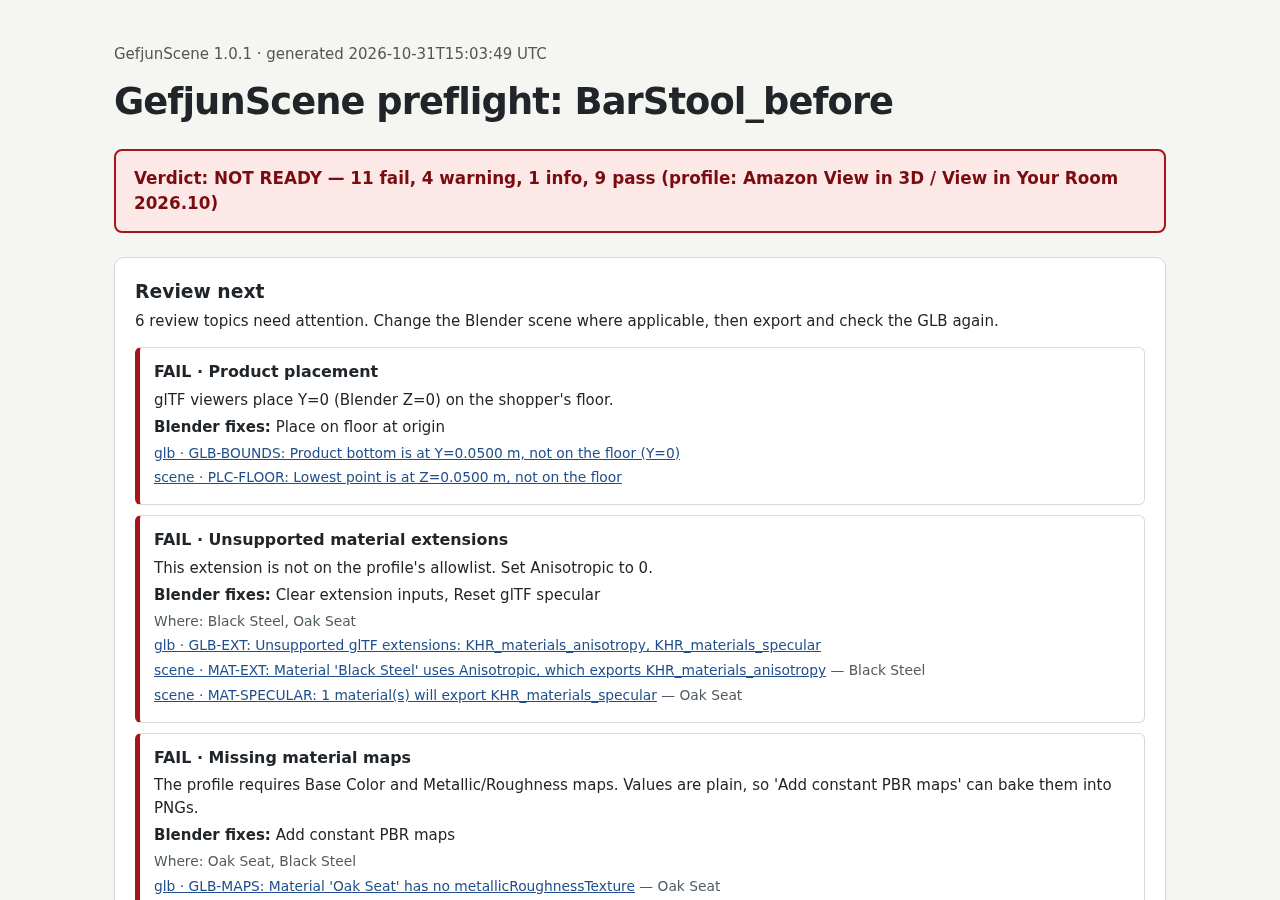
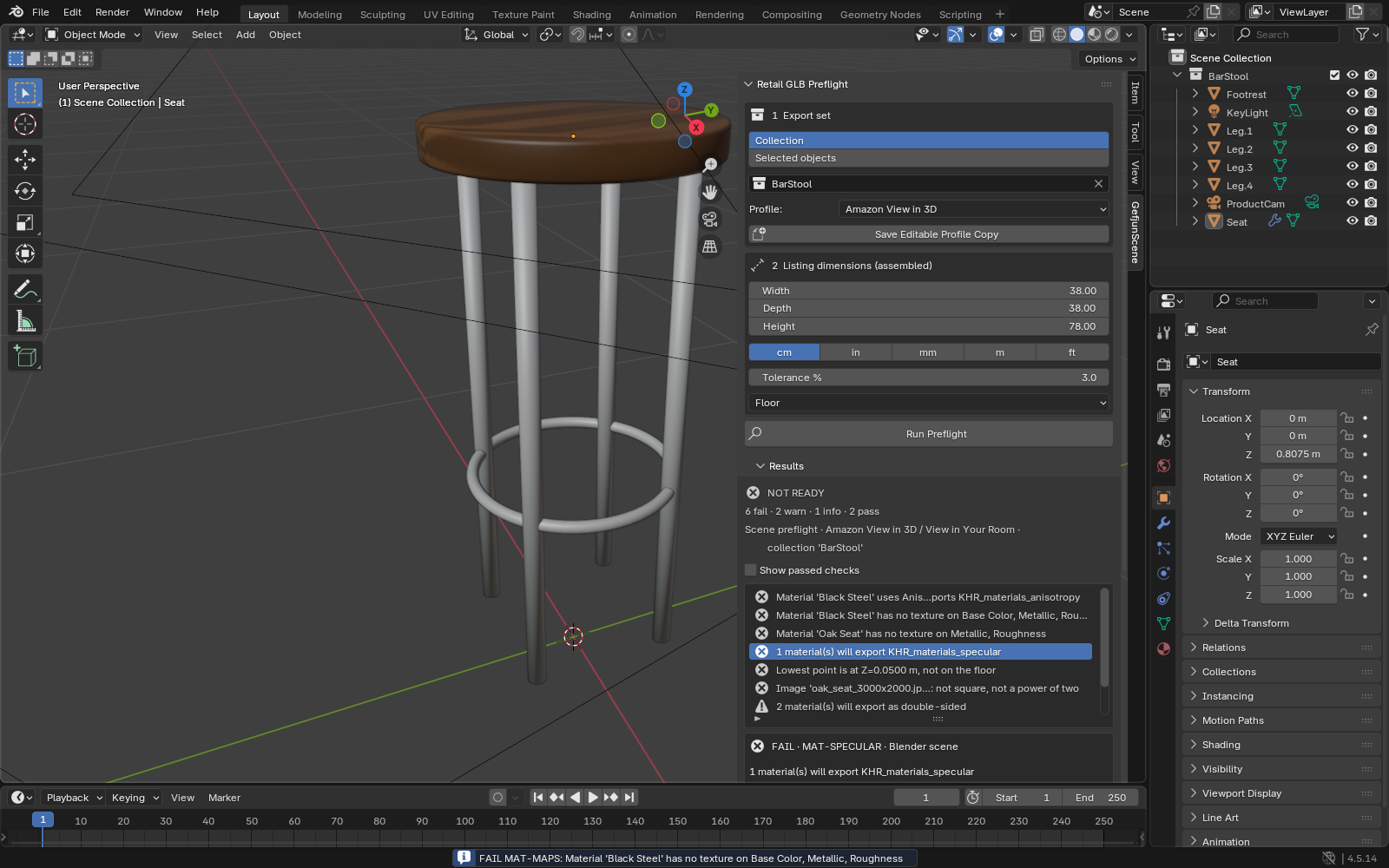
The fictional stool has before and fixed preflight reports.
Sample files and contents
The fictional bar_stool_problem.blend, Amazon example profile and saved reports in the free pack.
Practice files and guides are free. The complete app is included only where the product page says so.
2. In the app
Try it in three steps
- Open the failed report and inspect its 11 failures.
- Compare the fixed report and remaining UV warnings.
- Review the separate GUI result and exported model.
Show every click and setting
- Open BarStool_before.preflight.html: 11 FAIL and 4 WARN findings remain reachable through their individual links.
- Compare BarStool_fixed.preflight.html: the automated example clears blocking failures and retains two UV warnings.
- Follow the manual’s separate GUI workflow for UV preparation, then export and inspect the model yourself.
3. The result
Inspect the result
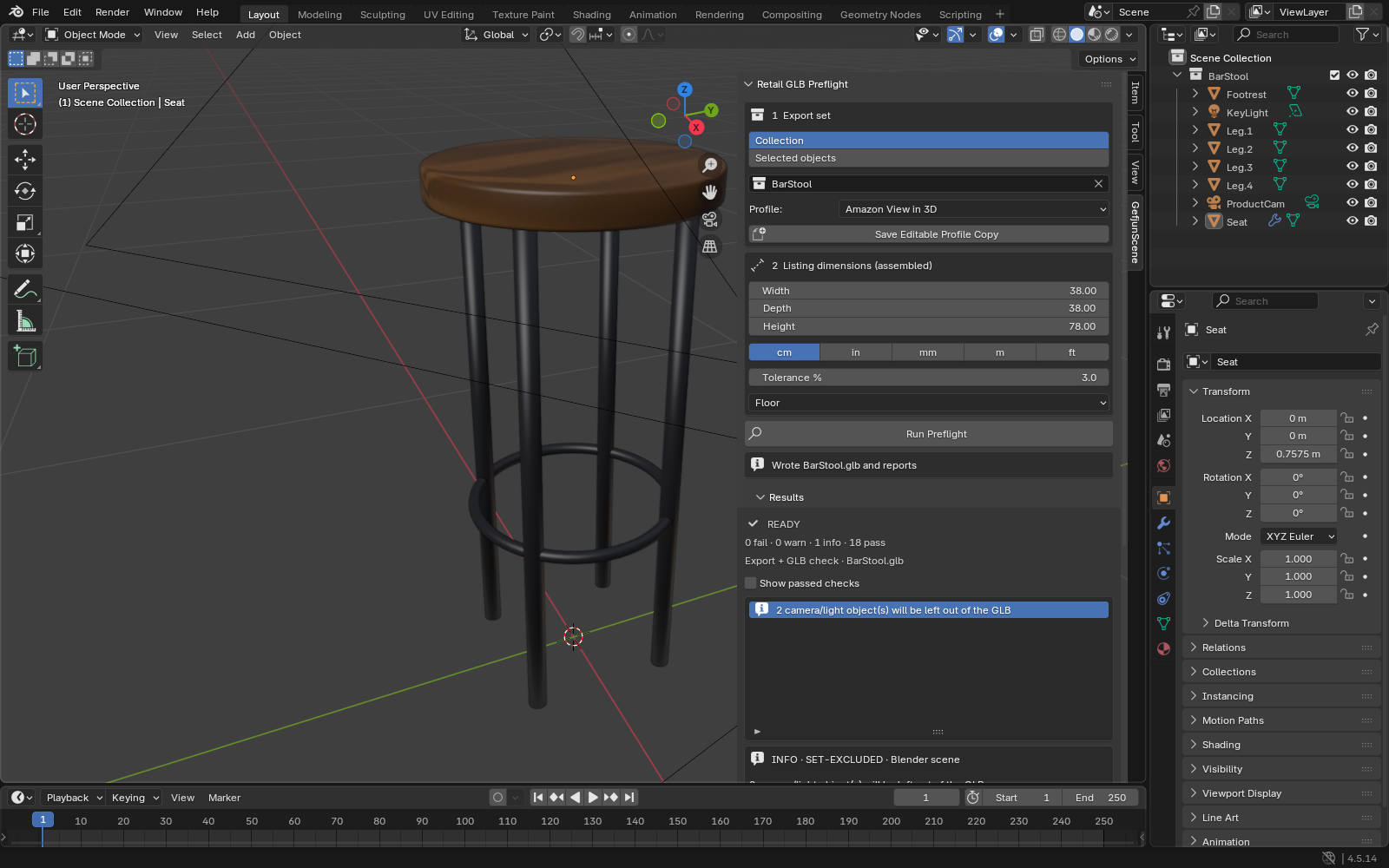
The fixed headless example has zero failures and two warnings; the GUI check has zero of each. Retailer acceptance is not certified.
What to check in the practice result
A GLB and readable local HTML/JSON report. The fixed headless example has 0 FAIL and 2 WARN; the verified GUI example has 0 FAIL and 0 WARN. Neither is a guarantee of retailer acceptance.
This fictional example is shown in the working interface and in the supplied result. Review the guide before using your own files.
What it helps you do
Inspect scene and texture issues, apply selected undoable fixes, export a GLB with locked settings, and follow every failure or warning in the grouped HTML/JSON handoff report.
What is in your download
- Installable Blender extension, full source and preserved license notices.
- Illustrated manual, fictional Blender fixtures, editable profiles and example reports.
Before you buy
- Blender 4.5.14 LTS or 5.2.2 LTS on Linux x64, tested with the installed extension.
- The inner gefjunscene-1.0.1.zip from the purchased bundle and a saved .blend file.
Extract GefjunScene-1.0.1.zip. In Blender 4.5 open Edit → Preferences → Get Extensions → Install from Disk and select the included gefjunscene-1.0.1.zip without unpacking that inner ZIP. Enable the extension.
Compatibility & limits
Blender 4.5.14 and 5.2.2 LTS on Linux x64 tested from the complete buyer ZIP; other operating systems and retailer uploads are unverified. Profiles are dated and editable, not retailer certification. Review textures, geometry and visual quality yourself. The free ModelReady GLB checker is an alternative; this tool adds Blender-side checks and fixes.
Get GefjunScene
This bundle includes GPL software. Your rights to use, study, modify and redistribute that software remain unchanged under the included GPL license. The purchase is for this prepared distribution and guide bundle.
Before payment, save the private recovery code shown by checkout. After Paddle confirms payment, use it to download your ZIP or return for it later. No subscription, future update or email delivery is promised. See the illustrated steps.
$7.99 USD · once
Buy download — $7.99