Chrome extension 1.0.0 · unpacked install
HermodLens
Scope PDF accessibility remediation from documents linked on selected website pages.
For small public-sector web teams or accessibility agencies scoping document remediation.
$49 USD · one-time purchase
Continue to checkoutStep-by-step guide
No subscription. Final total and tax appear at checkout.
What it helps you do
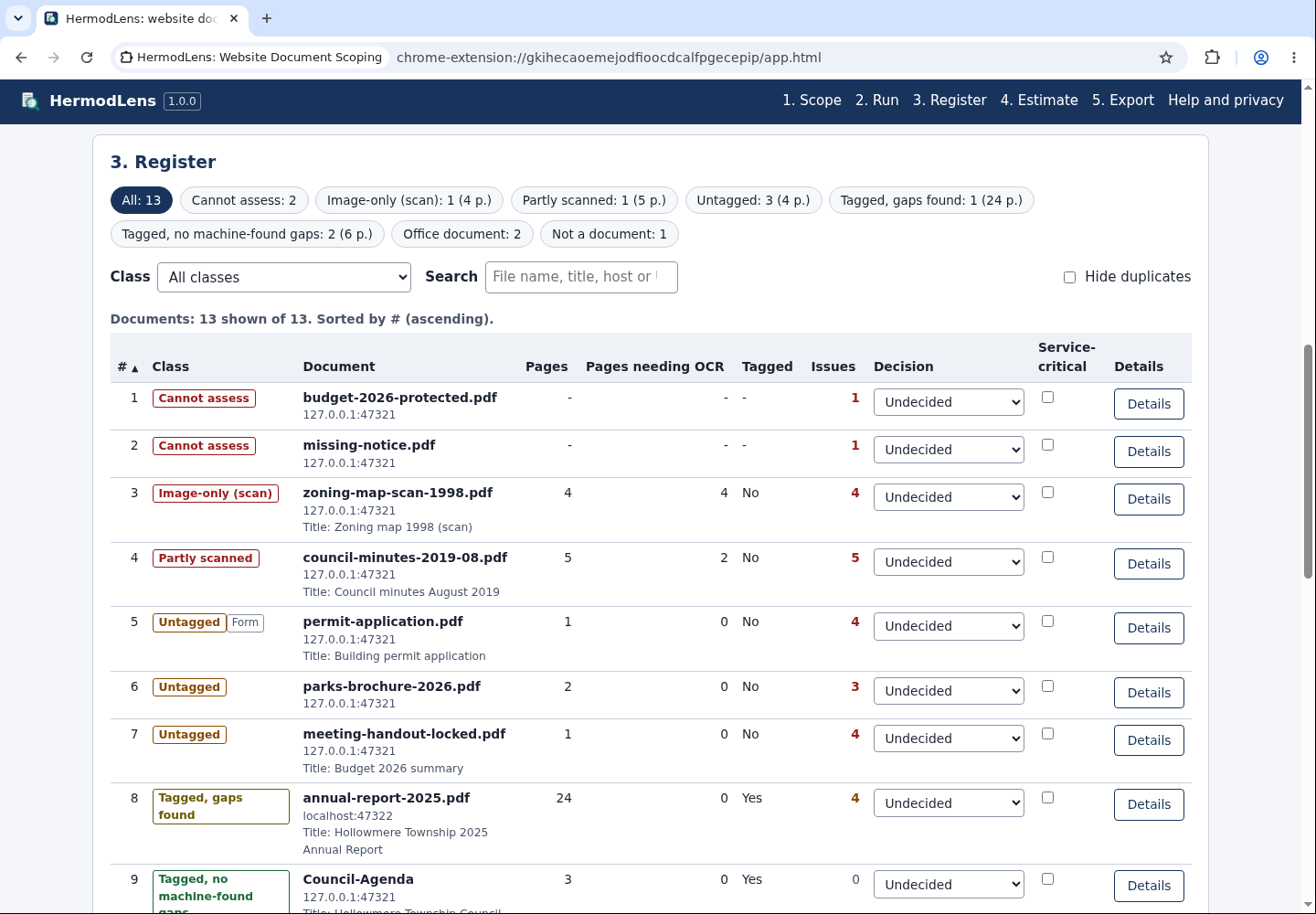
Collect linked PDFs and Office files from chosen pages, inspect PDFs locally, then export a remediation register and a page-based estimate using your own rates.
What is in your download
- Readable extension, illustrated manual, licence and third-party notices.
- Fictional website and sample CSV/HTML/JSON reports.
A practical example
Scope a fictional township site
Start with
The included Hollowmere Township pages with linked PDFs and Office documents.
Get this result
A local document register with page counts, classes and a low-high estimate; it does not certify accessibility.
Download illustrated manual and fictional examples (ZIP)
Examples use fictional or synthetic data. Follow this example step by step.
How it works
Install unpacked
Extract the purchased ZIP, open chrome://extensions, enable Developer mode and Load unpacked from its extension folder.
Collect and inspect
Choose authorised pages, collect their document links and run local PDF triage.
Export or remove
Review the register and estimate; export CSV, HTML or JSON. Remove the extension at chrome://extensions and delete the extracted folder.
Before you buy
- Google Chrome with Developer mode and Load unpacked permitted; tested with Chrome for Testing 152.0.7977.8 on Linux.
- Extracted HermodLens-1.0.0.zip and an authorised site or fictional example.
Extract HermodLens-1.0.0.zip into a permanent folder. In Chrome open chrome://extensions, enable Developer mode, choose Load unpacked and select the extracted extension folder containing manifest.json.
Compatibility & limits
Chrome for Testing 152 on Linux passed final installation and export checks. Chrome Web Store listing is unavailable; managed browser policy may block Developer mode or unpacked extensions. PDF checks are triage, not WCAG/PDF-UA certification or legal advice. Scanned and outlined documents need manual review; estimates use your own rates. Other browsers and customer sites are untested.
Get HermodLens
Perpetual use of the purchased version on your devices for personal or internal commercial work. Keep reasonable backups and modify your own copy; do not redistribute or resell original proprietary code. Third-party licenses and any existing preview permissions retain their rights.
Before payment, save the private recovery code shown by checkout. After Paddle confirms payment, use it to download your ZIP or return for it later. No subscription, future update or email delivery is promised. See the illustrated steps.
$49 USD · once
Buy download