Tool + guide bundle
HlinLink
Inventory and remap supported external Office links into new copies.
Workbooks or presentations still link to old paths such as S:\Projects\… or \\server\share\…, and you need copies whose links point to the new drive, share or web address, with an audit of every change.
$29 USD · one-time purchase
Continue to checkoutStep-by-step guide
No subscription. Final total and tax appear at checkout.
What it helps you do
Scan supported Excel and PowerPoint files, preview an explicit old-to-new link mapping, and apply it to new output copies with an audit trail.
What is in your download
- The original tool ZIP, preserved inside the download bundle.
- Installation and first-result instructions.
- A worked example and the included license notices.
A practical example
Move a bakery's links to SharePoint-style addresses
Start with
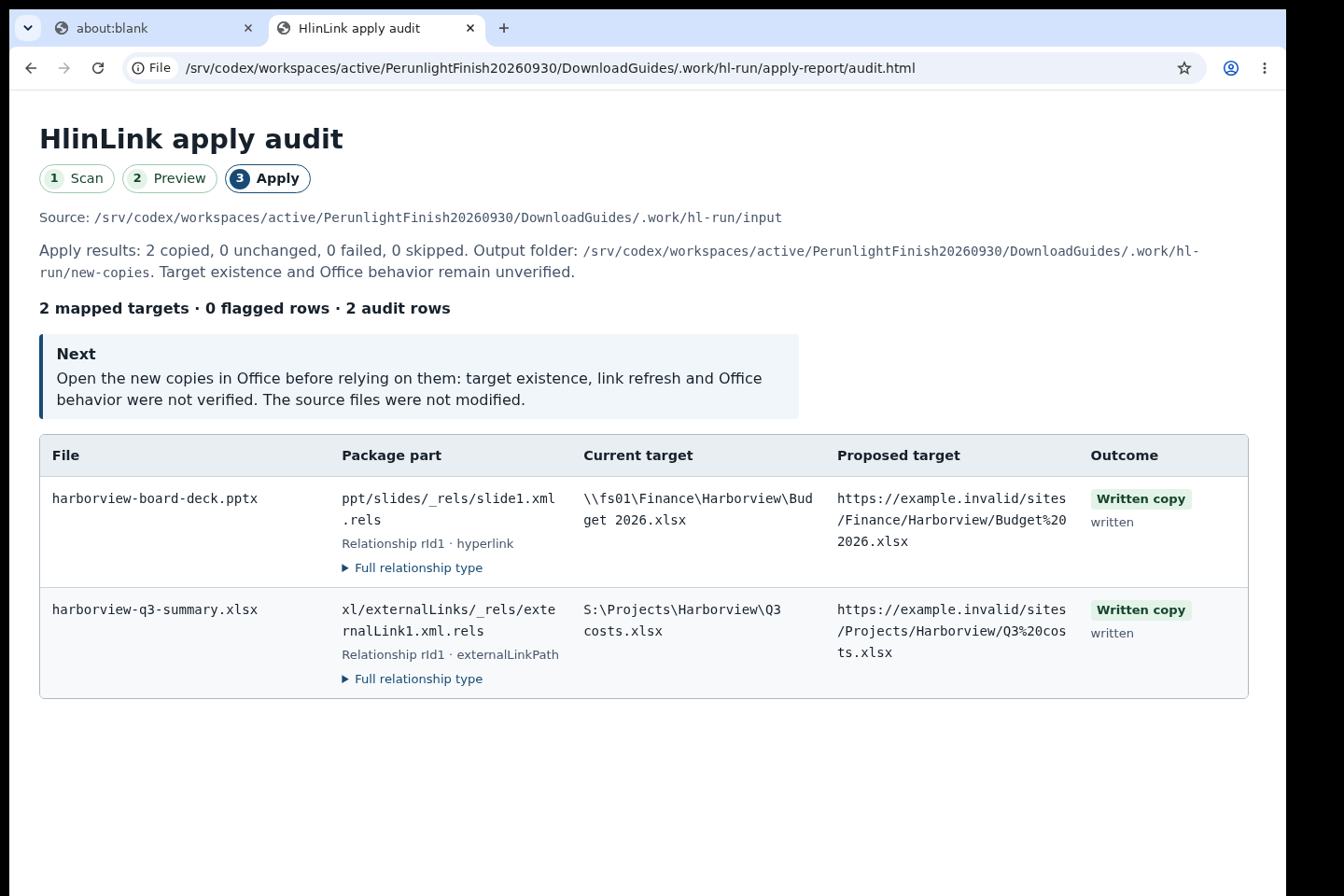
examples/hlinlink/input/ with two small synthetic files for the fictional Harborview bakery: harborview-q3-summary.xlsx (an external workbook link to S:\Projects\Harborview\Q3 costs.xlsx) and harborview-board-deck.pptx (a hyperlink to \\fs01\Finance\Harborview\Budget 2026.xlsx), plus examples/hlinlink/mapping.csv. The two files are minimal packages for trying the commands; they are not meant to be opened in Office.
Get this result
Scan prints: Scan: 2 Office files inventoried, 2 links, 0 unsupported inputs skipped. Preview prints: 2 links, 2 mapped. Apply prints: Apply: 2 copied, 0 failed/skipped, 0 unsupported inputs, and Source files were not modified. In new-copies the workbook link now points to https://example.invalid/sites/Projects/Harborview/Q3%20costs.xlsx and the slide link to https://example.invalid/sites/Finance/Harborview/Budget%202026.xlsx; apply-report/audit.csv shows both rows as mapped, supported, written. Every command exits with code 0.
Download guide & practice files (ZIP)
Examples use fictional or synthetic data. Follow this example step by step.
How it works
Download and extract your bundle
Buy the HlinLink bundle at /store/hlinlink/ and extract hlinlink-0.1.1-guide-bundle.zip. Then extract program/hlinlink-preview-20260929.zip into a separate folder. The app/, extension/, samples/ and docs/ paths below refer to that extracted program folder. GUIDE.html and examples/ in the outer bundle contain this manual and its practice material.
Install in a virtual environment
In a terminal in the unzipped folder run python3 -m venv .venv and activate it (macOS/Linux: source .venv/bin/activate; Windows: py -m venv .venv then .venv\Scripts\activate). Then run python -m pip install app/hlinlink-0.1.0-py3-none-any.whl and check with hlinlink --help.
1. Scan
Put copies of your files in a folder, for example input, and run hlinlink scan input --report scan-report. It prints how many Office files and links it found and the path of scan-report/audit.html. Open audit.html (or audit.csv) to see every external link.
Before you buy
- Python 3.10 or newer on Windows, macOS or Linux, and a terminal.
- Copies of the files to fix, in .xlsx, .xlsm or .pptx format. Word .docx files must not be used with apply in this preview; older .xls, .doc, .ppt and .xlsb files are skipped.
- A mapping CSV with the columns old_prefix,new_prefix,case_sensitive.
- The purchased hlinlink-0.1.1-guide-bundle.zip download. It contains program/hlinlink-preview-20260929.zip; the program itself is unchanged from the earlier release.
Extract the inner preview ZIP. With Python 3.10+ create a virtual environment, install app/hlinlink-0.1.0-py3-none-any.whl, then run hlinlink --help. Use scan, preview with a mapping CSV, inspect audit and plan, then apply to a fresh output directory.
Compatibility & limits
Supported link relationships in .xlsx, .xlsm, .pptx. .docx rewrite unsupported; targets are not checked or opened. Real migrations and every Office encoding unverified.
Get HlinLink
Perpetual use of the purchased version on your devices for personal or internal commercial work. Keep reasonable backups and modify your own copy; do not redistribute or resell original proprietary code. Third-party licenses and any existing preview permissions retain their rights.
Before payment, save the private recovery code shown by checkout. After Paddle confirms payment, use it to download your ZIP or return for it later. No subscription, future update or email delivery is promised. See the illustrated steps.
$29 USD · once
Buy download