HodrBoard · Offline competition board packager 1.0.0
Ready the boards. Check the brief.
Turn finished PDF, PNG and JPEG competition boards into consistently named JPEGs that meet your sheet size, resolution and file limits. Review the boards, then download an upload ZIP and a separate private receipt.
A competition accepts JPEG boards and you need to meet explicit pixel, file-size and naming requirements before making your own final anonymity check.
$19 USD · one-time purchase
Continue to checkoutStep-by-step guide
No subscription. Final total and tax appear at checkout.
Try the workflow on paper first
Includes the guide, actual screenshots and original fictional example files. The interactive packager is in the paid download.
- Use the rules in your brief: Set board count, sheet size, dpi, file limits and a registration-code naming pattern.
- Keep one quality across the set: Choose the highest common JPEG quality that fits all limits while retaining the required pixel dimensions.
- Keep private details separate: Download a ZIP containing only the renamed JPEG boards. Save the separate PRIVATE receipt for your records.
What it helps you do
For architecture students and small studios preparing finished presentation boards for a competition that accepts JPEG files. You supply the brief’s rules and make the final visual review.
What is in your download
- Offline browser application and bundled PDF renderer
- Illustrated HTML manual with actual product screenshots
- Fictional Lantern Pier brief and boards, plus practice files for identity and format checks
- README, licences and changelog
A practical example
Three fictional Lantern Pier boards
Start with
Original practice PNG, JPEG and PDF boards with fictional identity in file names or metadata, a matching brief, and separate practice files for visible identity and unsupported PDF layers.
Get this result
LP-0427-1.jpg, LP-0427-2.jpg and LP-0427-3.jpg, each 3508 × 2480 at 150 dpi. The tested Chrome run chose quality 90 and produced about 7.44 MB of JPEGs. The ZIP contains only these boards; the private receipt retains original names and findings. This is a fictional workflow example, not proof of competition acceptance.
Free illustrated guide and fictional practice boards; application not included
Examples use fictional or synthetic data. Follow this example step by step.
From the brief to the upload package
Actual application screens using original fictional Lantern Pier files.
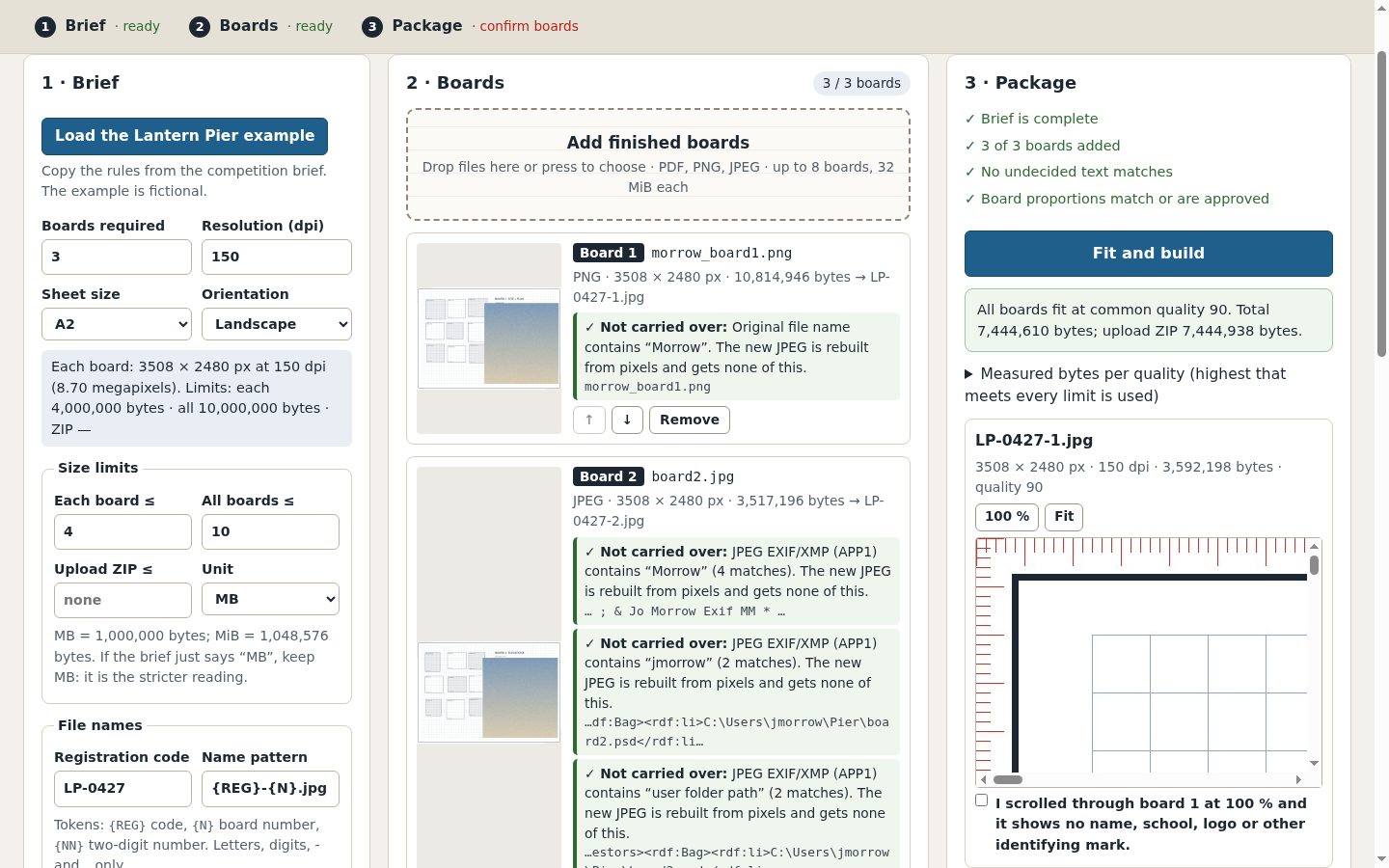
Inspect the boards before downloading
The measured file sizes and a 100% viewer help you review the rebuilt JPEGs. Each board needs your confirmation. View full size See what the files contain
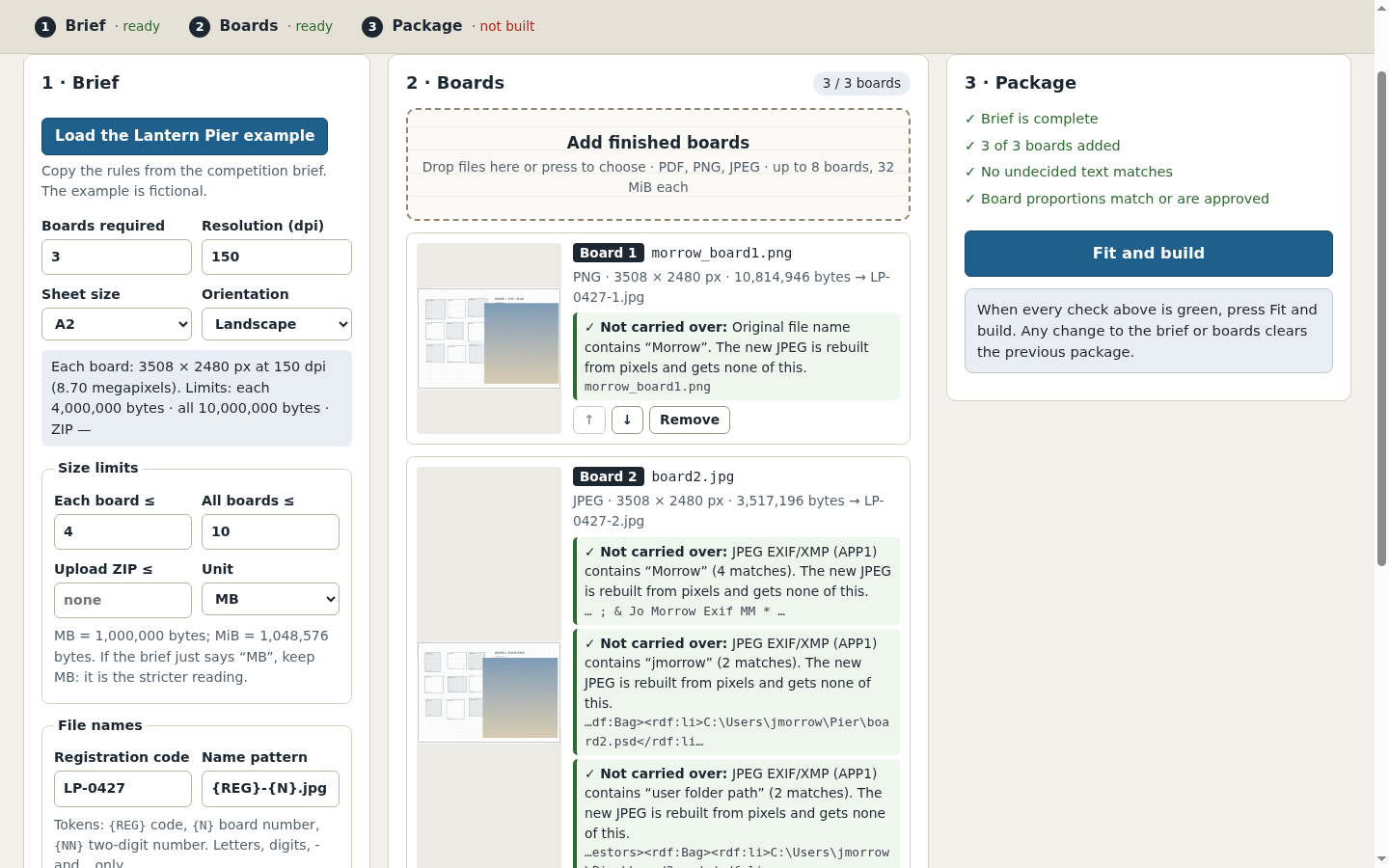
The fictional example shows identity terms found in original names and metadata. The private receipt records the findings. View full size Make the unresolved decisions
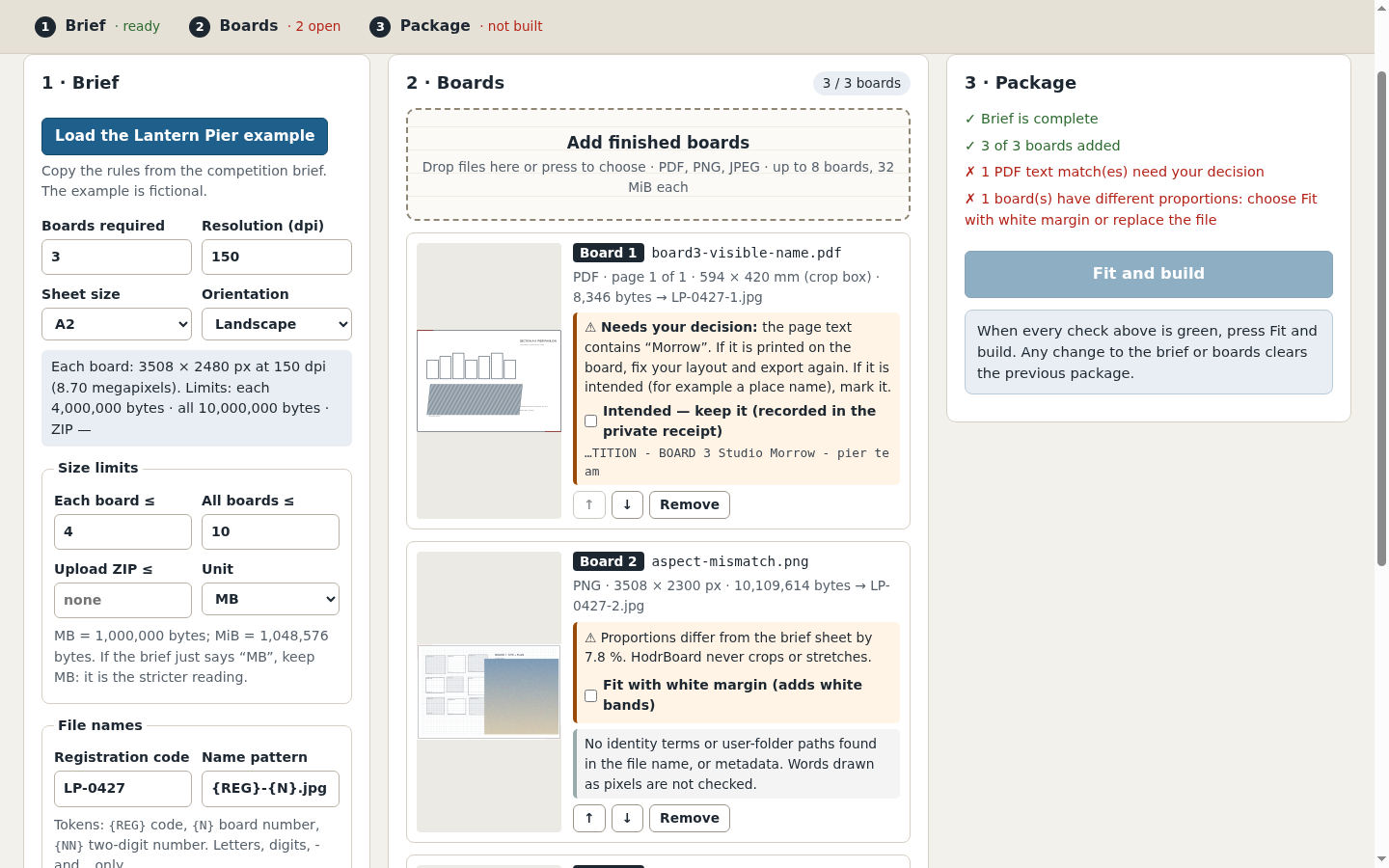
PDF page text needs your decision. Different sheet proportions require explicit fitting with white margins. View full size Know when the limits cannot be met
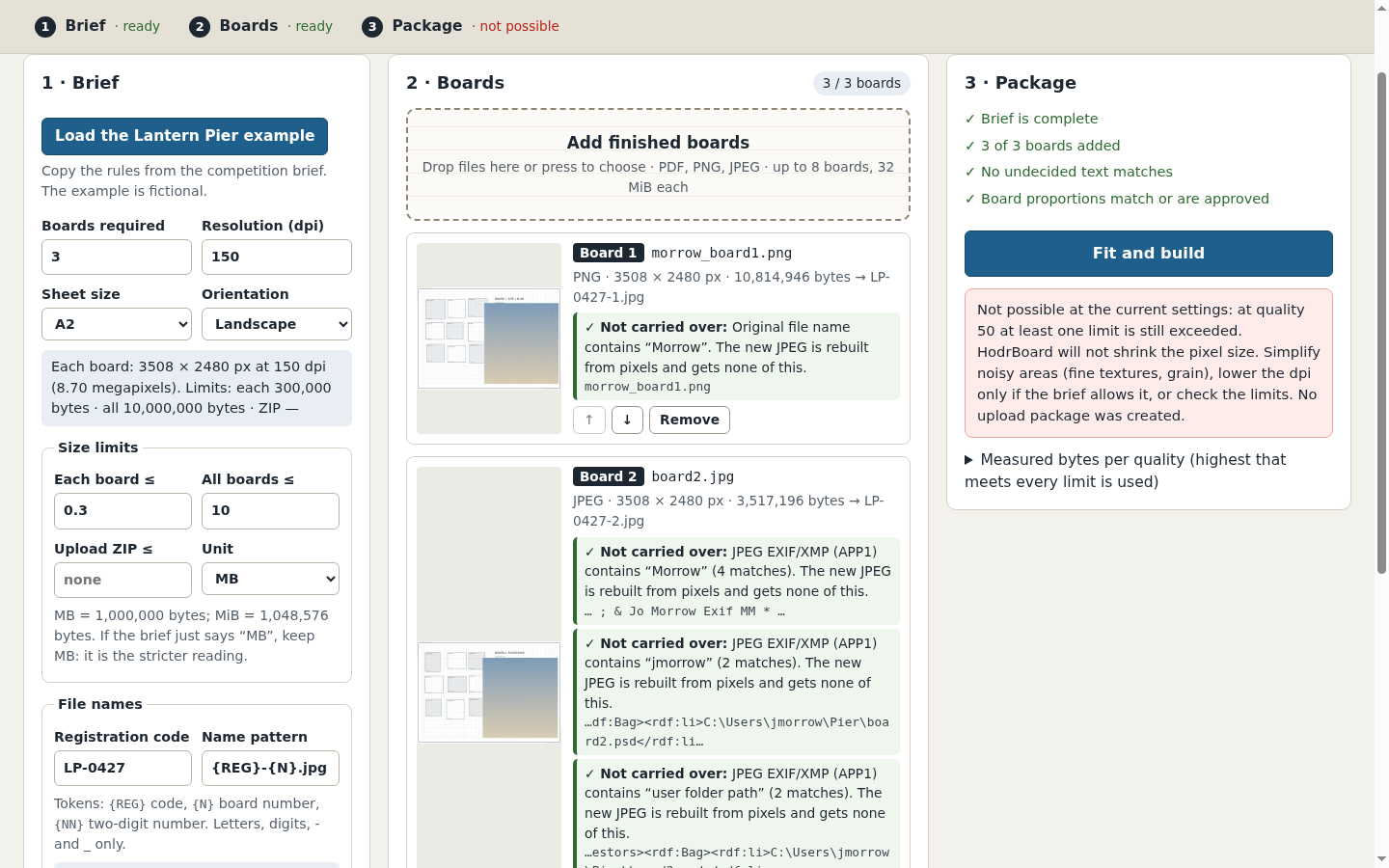
If even JPEG quality 50 is too large, no upload package is produced. Pixel dimensions are not silently reduced. View full size
How it works
Enter the brief
Copy board count, dimensions, dpi, limits and naming rules from the actual brief.
Review the boards
Choose the order and PDF pages; resolve text and proportion warnings.
Build and inspect
Fit the file sizes, inspect each JPEG at 100%, then save the upload ZIP and private receipt separately.
Before you buy
- Desktop Google Chrome; Chrome 152 on Linux was tested. Extract the whole buyer ZIP before opening HodrBoard.html.
- The actual competition brief and your finished PDF, PNG or JPEG boards. Keep original design files.
- Read the input and output limits before buying. This application does not edit your layout or automatically remove visible identity.
Extract the complete HodrBoard-1.0.0.zip and open HodrBoard.html in desktop Google Chrome. Load the fictional Lantern Pier example first and follow the illustrated guide. Processing runs locally; no account is needed.
Compatibility & limits
Enter the rules from your own competition brief. HodrBoard does not check a competition website, submit files, or guarantee acceptance or anonymity. No OCR or automatic visual redaction. Text, names, logos and signatures drawn as pixels are not detected. Review every board at 100% yourself; a text-search result is only a review aid. Up to eight boards, 32 MiB per input file, 128 MiB total input, 24 million pixels and 8192 pixels per side per source and output board, and 96 million output pixels in total. All limits apply together. A1 at 150 dpi is within the output limits; A2 at 300 dpi is not. Inputs: PDF, opaque 8-bit RGB/grey PNG, baseline/progressive RGB/grey JPEG, upright, untagged or sRGB (an embedded colour profile is judged by its measured colours, not its name). CMYK, 16-bit, indexed, alpha, animated, HDR/wide-gamut, other colour profiles and files tagged as rotated or mirrored (EXIF, also in PNG) are refused JPEG output only, at one common quality selected from 95, 90, 85, 80, 75, 70, 65, 60, 55 or 50. The application uses the highest tested quality meeting every byte limit. It never lowers the pixel dimensions to make a file fit. MB means 1,000,000 bytes and MiB means 1,048,576 bytes. The total-file limit and optional ZIP limit are separate; ZIP headers count toward the ZIP limit. PDF page selection respects the crop box and page rotation. PDFs with layers, encryption, signatures, forms/XFA or page annotations are refused. Non-embedded fonts may be substituted; export with embedded fonts and inspect fine labels and lines. A proportion difference above 0.5% requires your explicit choice to fit with white margins. Boards are never automatically cropped or stretched. The upload ZIP contains only renamed JPEGs. The separate PRIVATE brief and receipt contain your entered terms, original file names, findings and hashes; keep them yourself and do not submit them. Tested in desktop Chrome 152 on Linux. Other browsers, Windows, macOS and actual mobile devices are unverified. The 390-pixel layout was inspected in a desktop browser. The output is intended for screen submission, not a print colour proof. The fictional example demonstrates the workflow; no real competition submission or buyer outcome was tested. Exact JPEG byte counts can vary with Chrome versions; limits are checked against the files actually produced.
Get HodrBoard
Perpetual use of the purchased version on your devices for personal or internal commercial work. Keep reasonable backups and modify your own copy; do not redistribute or resell original proprietary code. Third-party licenses and any existing preview permissions retain their rights.
Before payment, save the private recovery code shown by checkout. After Paddle confirms payment, use it to download your ZIP or return for it later. No subscription, future update or email delivery is promised. See the illustrated steps.
$19 USD · once
Buy download