KolyadaPages · Offline rehearsal page workflow 1.0.1 · Chrome on Linux
A new draft. A clear list of pages to replace.
Lock a rehearsal edition from a plain-text play, review the next draft and print only the changed page groups. Give the company a change log, character sheets and a remove/insert checklist.
$0.99 USD · one-time purchase
Local browser app · opening steps
Unzip kolyada-pages-1.0.1.zip and open KolyadaPages.html in Google Chrome. No installation, account or internet connection is used.
Download: ZIP with the described tool and instructions. Check compatibility & limits.
See it in useBuy download — $0.99
No subscription. Final total and tax appear at checkout.
See the script and replacement pages first
Includes an original fictional play, the revision-1 replacement PDF, change log, swap checklist and answer sheet. The application is in the paid download.
- Keep the page groups: Add pages such as 2A and mark an empty group OMITTED.
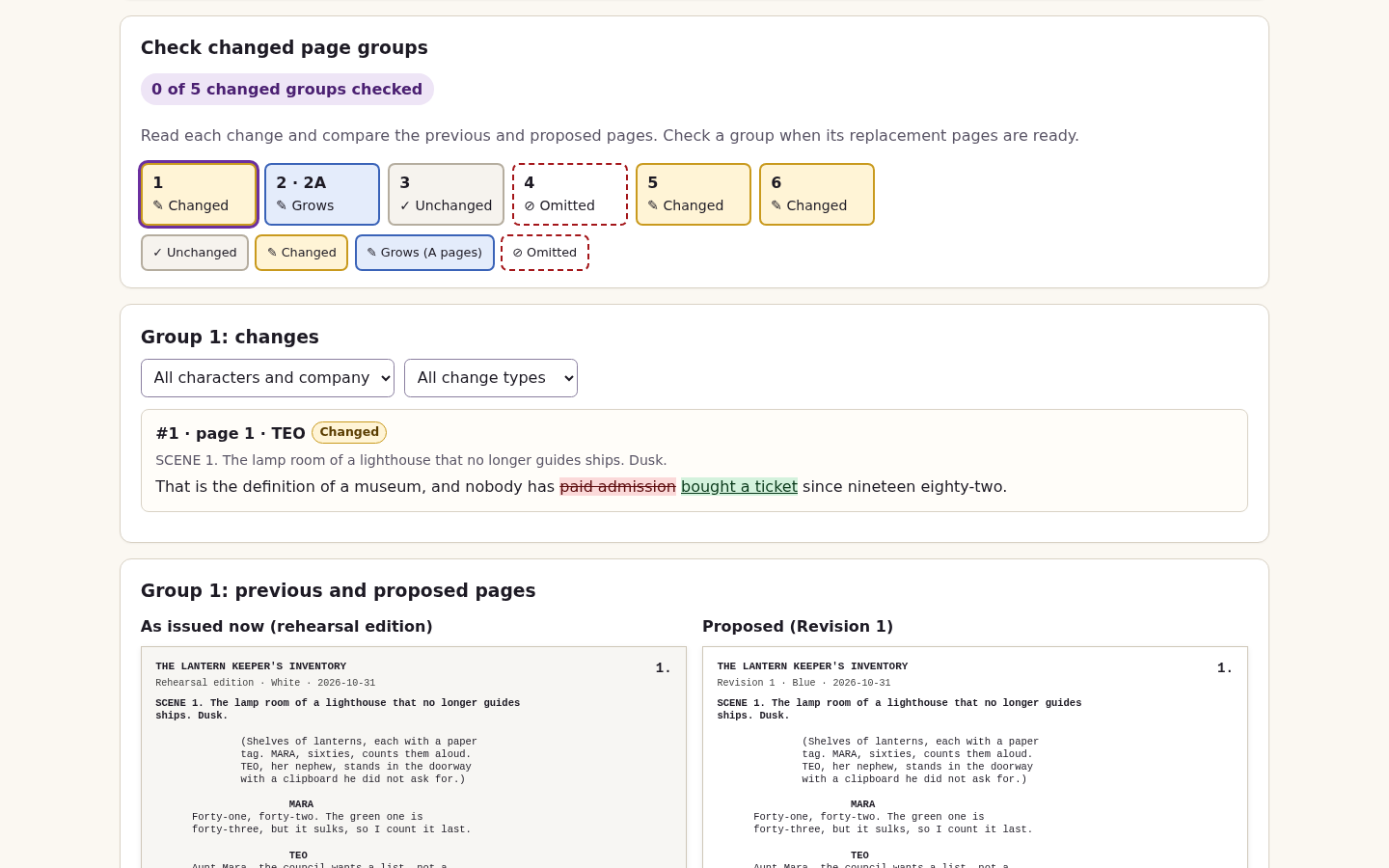
- Review each revision: Read each group’s changes beside its previous and proposed pages; check every changed group before committing.
- Make the swap explicit: Distribute replacement pages and a remove/insert checklist.
See it in use
Issue revised play pages
A screenshot walkthrough with fictional practice data. Select a step to explore.
1. Start with
Issue revised play pages
The fictional Lantern Keeper play begins as a locked six-page edition.
Sample files and contents
Three drafts of an original fictional play. The first locked edition contains six pages.
Practice files and guides are free. The complete app is included only where the product page says so.
2. In the app
Try it in three steps
- Lock the base script and load the Blue revision.
- Review all six changes and check changed groups.
- Inspect replacement pages and the swap checklist; optionally repeat with Pink.
Show every click and setting
- Lock the sample edition and load Blue.
- Compare group 2, review all six changes and explicitly check each of the five changed groups before committing Blue.
- Inspect the replacement PDF and swap checklist. Optionally repeat with Pink.
3. The result
Inspect the result
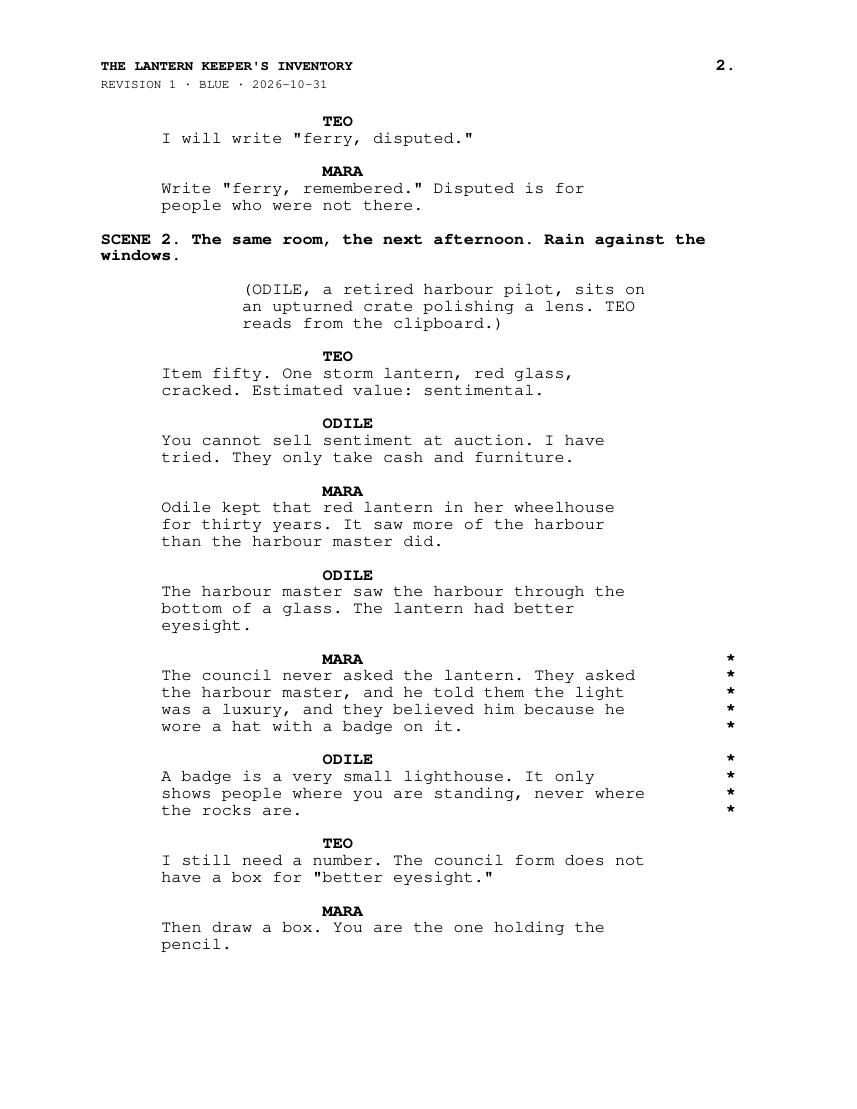
The Blue issue provides replacement pages, including page 2A and an omitted-page notice. The PDF is a print preview, not physical printing proof.
What to check in the practice result
Locked edition: 6 pages. Revision 1: 6 changes (1 changed speech, 2 added speeches, 2 cut speeches, 1 changed stage direction), replacement pages 1, 2, 2A, 4 OMITTED, 5 and 6, and a full script of 7 pages. Page 3 is not reissued. Character sheets list INSPECTOR 1, MARA 1, ODILE 2 and TEO 1, plus 1 company change. Revision 2 (Pink): 4 changes; pages 2, 4 and 6 are replaced, 2A is removed and page 4 gets text again.
This fictional example is shown in the working interface and in the supplied result. Review the guide before using your own files.
What it helps you do
For new and devised plays that change during rehearsal. Adopt KolyadaPages before printing the first binders: it creates its own page layout and keeps those primary page numbers through subsequent drafts.
What is in your download
- KolyadaPages.html (the app, offline)
- manual/index.html with screenshots
- sample/: three drafts of the original fictional play 'The Lantern Keeper's Inventory'
- README.md, DEVELOPMENT.md, LICENSE.txt, NOTICES.txt, CHANGELOG.md and release notes
- source/: readable source, build and packaging scripts, tests and the independent PDF/CSV oracle
Before you buy
- Google Chrome on Linux. Chrome 152 desktop and narrow layouts were tested; other operating systems, browsers and physical printers are unverified.
- Extract the buyer ZIP and open KolyadaPages.html. No account, installation or internet connection is needed.
- UTF-8 TXT scripts using the documented TITLE, ACT/SCENE, NAME: speech and bracketed stage-direction conventions. Printed characters must be supported by Windows-1252.
- Start before the first binders are printed. Existing Word, PDF or Final Draft pagination cannot be preserved.
Unzip kolyada-pages-1.0.1.zip and open KolyadaPages.html in Google Chrome. No installation, account or internet connection is used.
Compatibility & limits
Adopt before printing binders: it cannot reproduce page numbers of scripts already printed from Word, Final Draft or PDF. Input is UTF-8 TXT only; no DOCX, PDF or Final Draft import in 1.0. Only characters printable in Windows-1252 are accepted; others block locking/commit and are listed by line and code point. 2 MiB per draft, 1,000 paragraphs, 30 roles, 30-character speaker names, 100 current pages including A pages and OMITTED placeholders, 10 overflow pages per group, 10 revisions after the locked edition (then lock a new edition), 50 recipients of up to 60 characters, 48 MiB project file. Going past a limit shows a specific message and leaves the open project unchanged. Change pairing is automatic and can misjudge moved or heavily rewritten speeches; every change must be reviewed. Moved text appears as cut plus added. No annotation transfer, no sending or sharing feature, no hosting. Tested only in Google Chrome on Linux; other browsers, macOS, Windows and physical printers are untested.
Get KolyadaPages
Perpetual use of the purchased version on your devices for personal or internal commercial work. Keep reasonable backups and modify your own copy; do not redistribute or resell original proprietary code. Third-party licenses and any existing preview permissions retain their rights.
Before payment, save the private recovery code shown by checkout. After Paddle confirms payment, use it to download your ZIP or return for it later. No subscription, future update or email delivery is promised. See the illustrated steps.
$0.99 USD · once
Buy download — $0.99