Offline edition
Mokosha
Plan a hexagon quilt and export its layout.
You are designing a hexagon quilt top and want to try colour layouts, count the pieces per colour and print templates.
$12 USD · one-time purchase
Continue to checkoutStep-by-step guide
No subscription. Final total and tax appear at checkout.
What it helps you do
Arrange colours in a hexagon quilt layout, save the design and export a planning booklet. Check measurements and seam allowances before cutting.
What is in your download
- The described tool, packaged for local use.
- Installation and first-result instructions.
- A worked example and the included license notices.
A practical example
Print the Control A stripe layout
Start with
No file needed: the built-in design Control A — jagged, pointy. A saved copy to try with Import project… is in examples/mokosha/control-a-jagged-pointy-stripes.mokosha.json.
Get this result
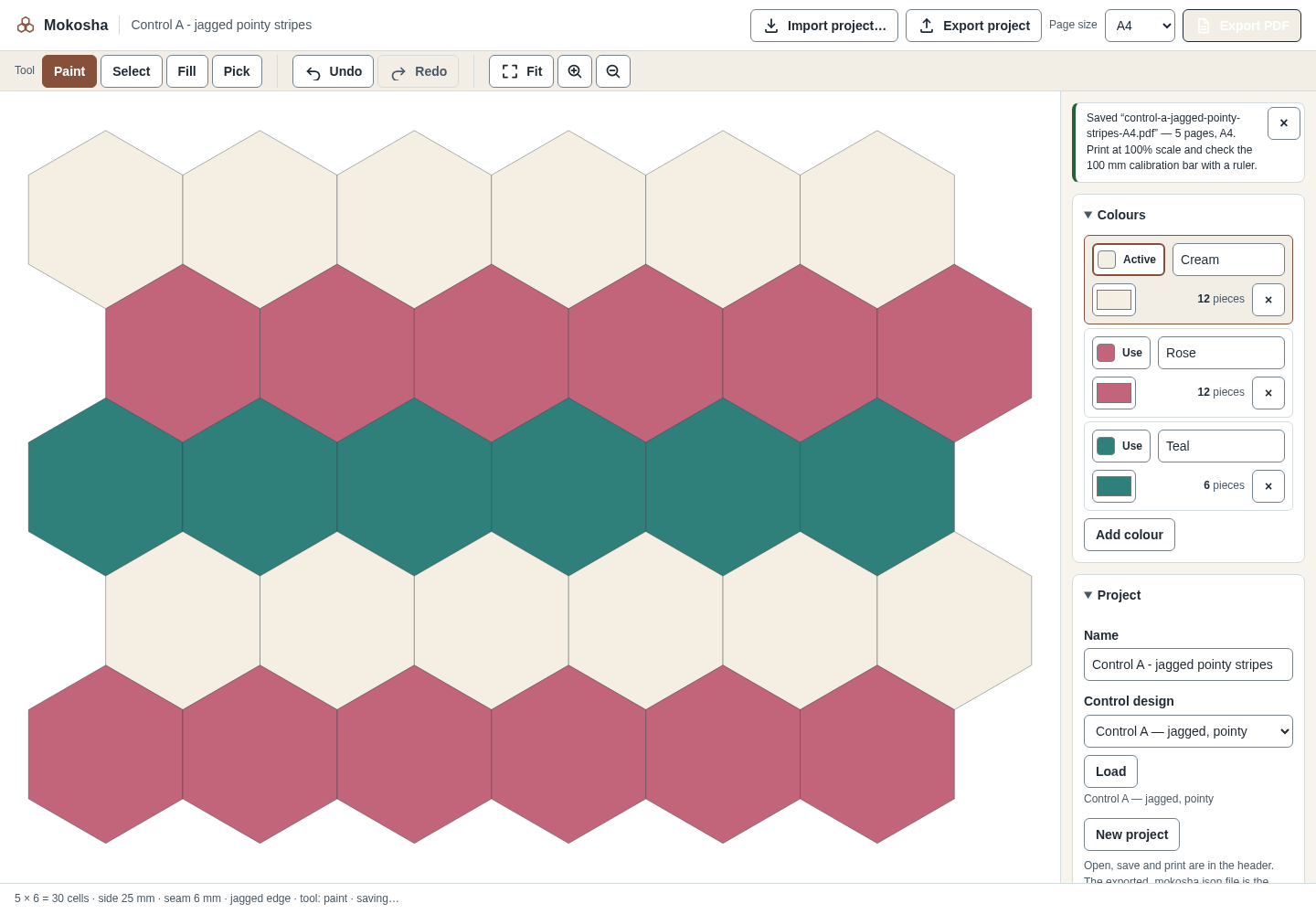
The status reads “Loaded "Control A - jagged pointy stripes".” Piece counts show 30 full hexagons (Cream 12, Rose 12, Teal 6) and a finished top of 281.5 × 200.0 mm. Export PDF downloads control-a-jagged-pointy-stripes-A4.pdf with 5 pages: plan summary, pieces by colour, cutting plan, 1:1 templates and a layout diagram. Export project downloads control-a-jagged-pointy-stripes.mokosha.json; importing it later, even after clearing the browser's storage, shows “Imported “Control A - jagged pointy stripes” — 30 pieces.”
Download guide & practice files (ZIP)
Examples use fictional or synthetic data. Follow this example step by step.
How it works
Open the downloaded local edition
Buy and extract the Mokosha ZIP, then open its Mokosha folder. Install Node.js 20.12 or newer. In this extracted folder run: node start.mjs
Open http://127.0.0.1:8787/ in desktop Google Chrome. Keep the terminal open; Ctrl+C stops it. The same workflow can be explored in the online browser preview.Open Mokosha
In your open local copy, follow the controls described below. The header holds Import project…, Export project, Page size and Export PDF.
Start a layout
Under Project, choose a design (Control A — jagged, pointy; Control B — straight edge, pointy; Control C — straight edge, flat) and click Load, or click New project. Type your quilt's name in Name.
Before you buy
- Desktop Google Chrome or another Chromium-based browser. The tool was checked in desktop Chrome; other browsers are not verified.
- No files are needed to start: three control designs are built in.
- Install Node.js 20.12 or newer. In this extracted folder run: node start.mjs
Open http://127.0.0.1:8787/ in desktop Google Chrome. Keep the terminal open; Ctrl+C stops it.
Compatibility & limits
Up to 2500 cells. Regular hexagons only. Print at 100% and measure the 100 mm calibration bar. Fabric estimates depend on usable width and cutting assumptions; verify before cutting.
Try it first
Try the same core workflow in the browser. The purchase gives you a downloadable local copy with installation instructions and examples; no paid-only features are claimed.
Open the previewGet Mokosha
Perpetual use of the purchased version on your devices for personal or internal commercial work. Keep reasonable backups and modify your own copy; do not redistribute or resell original proprietary code. Third-party licenses and any existing preview permissions retain their rights.
Before payment, save the private recovery code shown by checkout. After Paddle confirms payment, use it to download your ZIP or return for it later. No subscription, future update or email delivery is promised. See the illustrated steps.
$12 USD · once
Buy download