Chrome extension 1.0.1 · unpacked install
MuninCompare
Compare two local analytics HAR captures to spot removed, added, changed and repeated GA4 or Adobe Analytics events.
For analysts or QA teams reviewing an authorised before/after browser journey.
$39 USD · one-time purchase
Continue to checkoutStep-by-step guide
No subscription. Final total and tax appear at checkout.
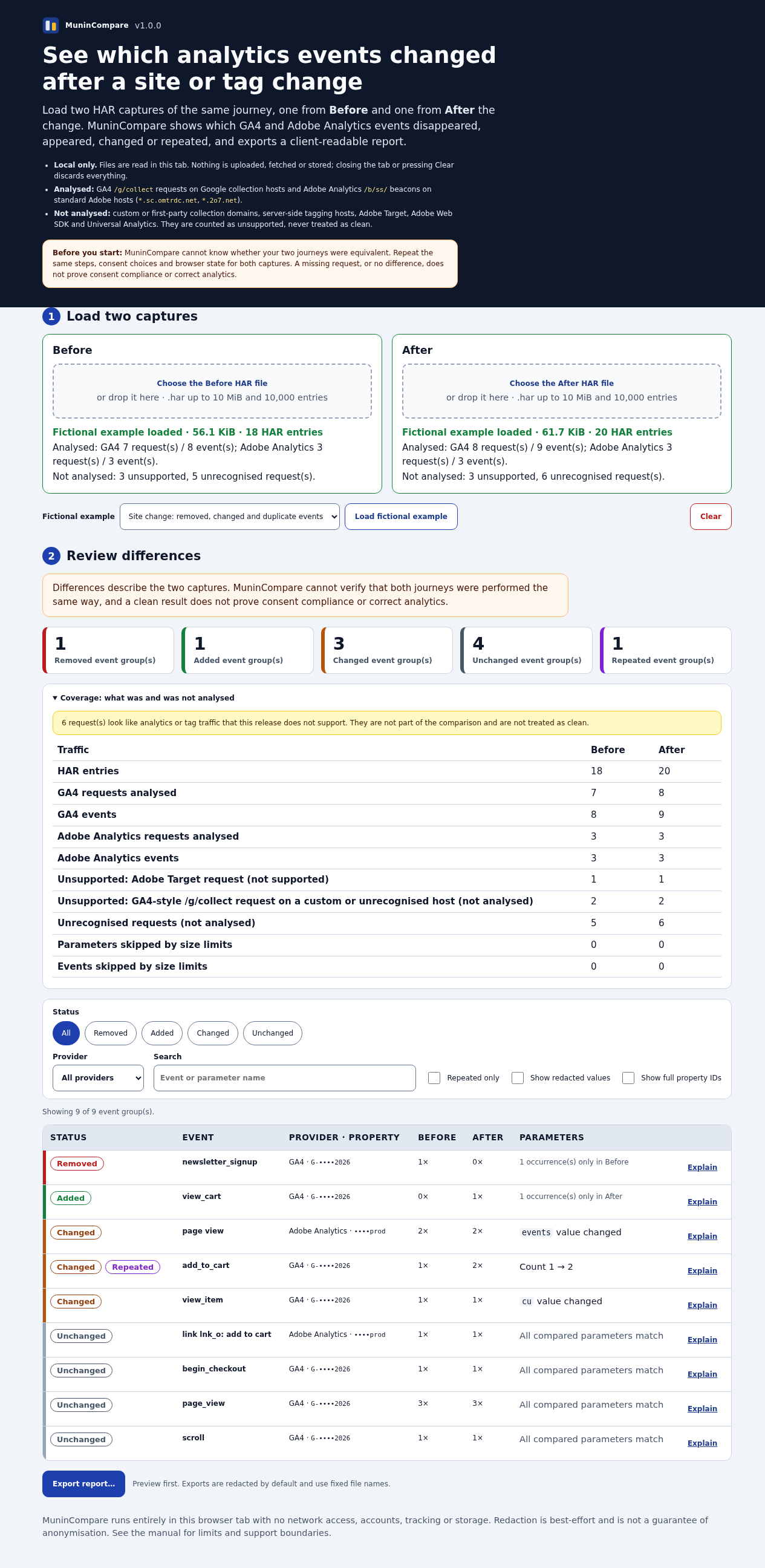
What it helps you do
Load two captures of the same authorised journey, review supported traffic and differences, then export a redacted HTML report, CSV or JSON.
What is in your download
- MuninCompare 1.0.1 readable Manifest V3 extension and licence.
- Illustrated installation/manual and four fictional HAR examples.
- Redacted HTML, CSV and JSON export tools; no account or subscription.
A practical example
Find changes in a fictional checkout journey
Start with
The included fictional changes-before.har and changes-after.har, captured as equivalent test journeys.
Get this result
A local difference report with added, removed, changed or repeated supported analytics events. It does not certify correct tracking or consent.
Download illustrated manual and fictional HAR examples (ZIP)
Examples use fictional or synthetic data. Follow this example step by step.
How it works
Load two captures
Use the fictional HAR pair or two comparable authorised journeys.
Review differences
Read supported GA4 and Adobe Analytics event changes and unsupported traffic.
Export a report
Preview and save local redacted HTML, CSV or JSON.
Before you buy
- Google Chrome 120+ with Developer mode and Load unpacked allowed; tested in Chrome for Testing 151 on Linux. Managed browser policy may forbid this.
- MuninCompare-1.0.1.zip; this is not a Chrome Web Store listing.
- Two HAR files from an authorised, comparable journey; start with the fictional examples.
Extract MuninCompare-1.0.1.zip to a permanent folder. In Chrome 120+ open chrome://extensions, enable Developer mode, choose Load unpacked, and select its extension folder. Tested in Chrome for Testing 151 on Linux.
Compatibility & limits
Requires an unpacked extension and Developer mode; enterprise policy may block installation. No Chrome Web Store listing. Does not capture traffic or connect to analytics services. Adobe Web SDK, Adobe Target and custom collection domains are unsupported. Reports are not guaranteed anonymous; inspect before sharing. Equivalent journeys and analytics correctness are not certified. Other browsers and customer data are untested.
Get MuninCompare
Perpetual use of the purchased version on your devices for personal or internal commercial work. Keep reasonable backups and modify your own copy; do not redistribute or resell original proprietary code. Third-party licenses and any existing preview permissions retain their rights.
Before payment, save the private recovery code shown by checkout. After Paddle confirms payment, use it to download your ZIP or return for it later. No subscription, future update or email delivery is promised. See the illustrated steps.
$39 USD · once
Buy download