SagaRelic · Offline collection handoff 1.0.1
Let people explore the objects. Choose what they can see.
Turn selected collection records and photographs into a searchable catalogue that opens offline. Review what to share and keep the chosen original images unchanged.
$0.99 USD · one-time purchase
Local browser app · opening steps
Extract the whole SagaRelic-1.0.1.zip and open app/index.html in desktop Google Chrome. No server or account is needed. Start with Explore Lantern Quay. Recipients extract their ZIP and open index.html.
Download: ZIP with the described tool and instructions. Check compatibility & limits.
See it in useBuy download — $0.99
No subscription. Final total and tax appear at checkout.
Explore the practice collection
The free pack contains the illustrated guide, fictional collection and templates. The author application is in the paid download.
- Resolve links beside the review: See unresolved photo relationships, keep an explicit missing label or jump to the exact row. Review every caption and public field yourself.
- Keep original images: Selected originals retain their bytes, alongside thumbnails, CSV/JSON records and a checksum manifest.
- Share a portable folder: Recipients can search and inspect objects locally without an account or server.
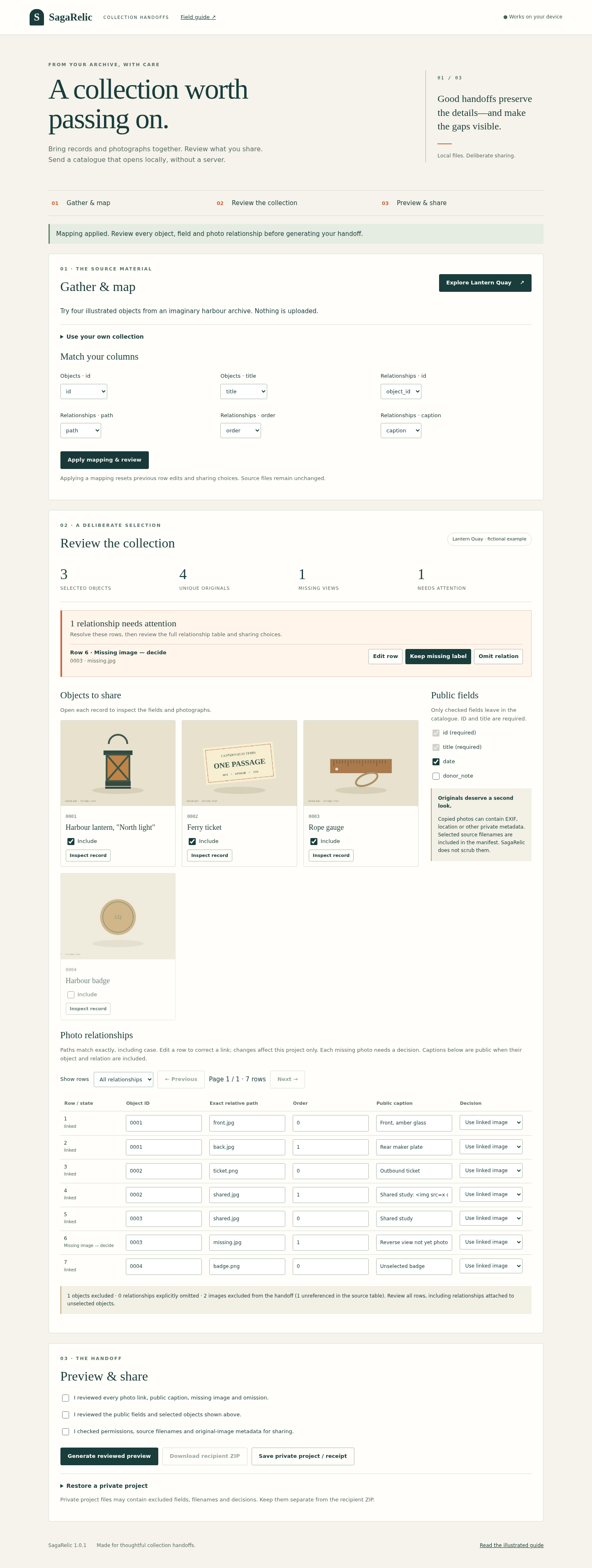
See it in use
Assemble a local collection catalogue
A screenshot walkthrough with fictional practice data. Select a step to explore.
1. Start with
Assemble a local collection catalogue
Lantern Quay has four objects, seven relationships and six original images.
Sample files and contents
Four object records, seven relationship rows and six original illustrations. Object 0003 references a deliberately missing reverse photograph.
Practice files and guides are free. The complete app is included only where the product page says so.
2. In the app
Try it in three steps
- Keep objects 0001–0003 and selected catalog fields.
- Resolve one missing image label and review acknowledgments.
- Export, extract and reopen the recipient ZIP.
Show every click and setting
- Keep 0001–0003 and id/title/date only.
- Set row 6 to Keep missing label and complete the three acknowledgments.
- Inspect the catalogue, then extract and reopen the recipient ZIP.
3. The result
Inspect the result
The searchable local catalogue has three objects, six relationships and one marked missing image. Chosen originals retain their bytes.
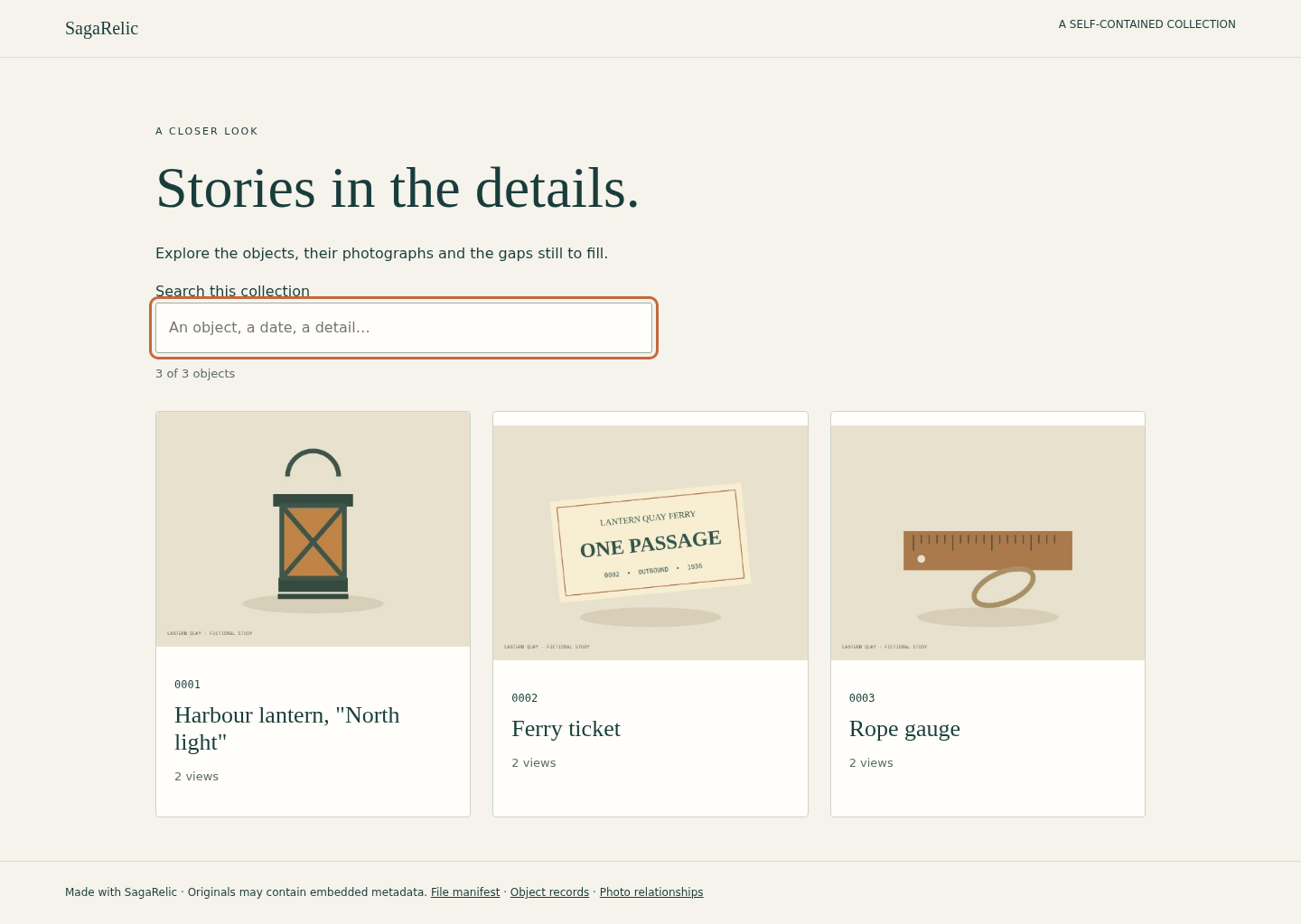
What to check in the practice result
3 objects, 6 relationships, 4 unique original files and 1 missing marker. 0001 shows front then back; shared.jpg belongs to both 0002 and 0003. The donor_note column, badge and orphan are excluded.
This fictional example is shown in the working interface and in the supplied result. Review the guide before using your own files.
What it helps you do
For volunteer collection leads and small archives working from object tables and their own photographs. Select records and fields, resolve photo links and share an extracted catalogue folder.
What is in your download
- SagaRelic 1.0.1 offline author app and readable runtime source.
- Original Lantern Quay collection, six illustrations, source tables, templates and expected result.
- Illustrated English field guide and five actual interface screenshots.
- Optional Python recipient-integrity checker, development tests and deterministic archive builder.
- Unchanged licence and provenance; README, release notes and file checksums.
Before you buy
- Desktop Google Chrome on Linux was tested. The accepted environment used Chrome 152 on Ubuntu 22.04.5 x86_64; other systems and devices remain unverified.
- Extract the complete buyer ZIP and keep its files together. No build step, server or internet connection is needed.
- For your own collection, prepare UTF-8 object and relationship tables plus supported local JPEG/PNG originals. Review permissions, filenames and image metadata before sharing.
- The optional extracted-catalogue integrity checker needs Python 3.10+.
Extract the whole SagaRelic-1.0.1.zip and open app/index.html in desktop Google Chrome. No server or account is needed. Start with Explore Lantern Quay. Recipients extract their ZIP and open index.html.
Compatibility & limits
Maximum 1000 objects, 10000 relationships and 3000 selected image files. 8 MiB per UTF-8 CSV/TSV, 16 MiB per image, 256 MiB input media total and 24 million pixels per image; 16 MiB private project JSON. JPEG: 8-bit baseline/progressive grayscale or three-component. PNG: 8-bit, noninterlaced grayscale/RGB/grayscale-alpha/RGBA; indexed color, 16-bit, animation and embedded ICC profiles are not supported. 100 columns and 100000 characters per cell; exact IDs and unambiguous relative paths. See the guide for all format rules. No XLSX, native museum-system import, ZIP import, object identification, cloud publication or preservation certification. Originals may contain private metadata. Public field selection does not anonymize photographs or filenames. CSV formula-triggering cells receive a disclosed reversible apostrophe prefix; exact values remain in the catalogue JSON. No spreadsheet application import is claimed. Other browsers, operating systems and mobile devices are unverified. Narrow-screen checks use desktop Chrome at 390 pixels. No autosave; retain original sources and download the separate private project to resume.
Get SagaRelic
Perpetual use of the purchased version on your devices for personal or internal commercial work. Keep reasonable backups and modify your own copy; do not redistribute or resell original proprietary code. Third-party licenses and any existing preview permissions retain their rights.
Before payment, save the private recovery code shown by checkout. After Paddle confirms payment, use it to download your ZIP or return for it later. No subscription, future update or email delivery is promised. See the illustrated steps.
$0.99 USD · once
Buy download — $0.99