Local download
SifBatch
Turn a generic CSV or TSV of personalized orders into a checked production batch.
You make personalized items (for example engraved boards, tags or coasters) and want to catch empty, too-long or unsafe personalization text before it reaches LightBurn's variable text.
$19 USD · one-time purchase
Continue to checkoutStep-by-step guide
No subscription. Final total and tax appear at checkout.
What it helps you do
Map columns, review blocking and warning checks, and export a LightBurn-style Merge/CSV file, printable proof sheet, and batch ZIP.
What is in your download
- The complete tool for the workflow described here.
- Installation instructions and included license notices.
A practical example
Six engraved-coaster orders with three deliberate problems
Start with
examples/sif-batch/coaster-orders.csv (6 fictional orders: one with quantity 2, one name longer than 20 characters, one that starts like a spreadsheet formula, one with an empty name) and examples/sif-batch/coaster-mapping.json (Name required, max 20 characters; Date optional; Font required; Copy number).
Get this result
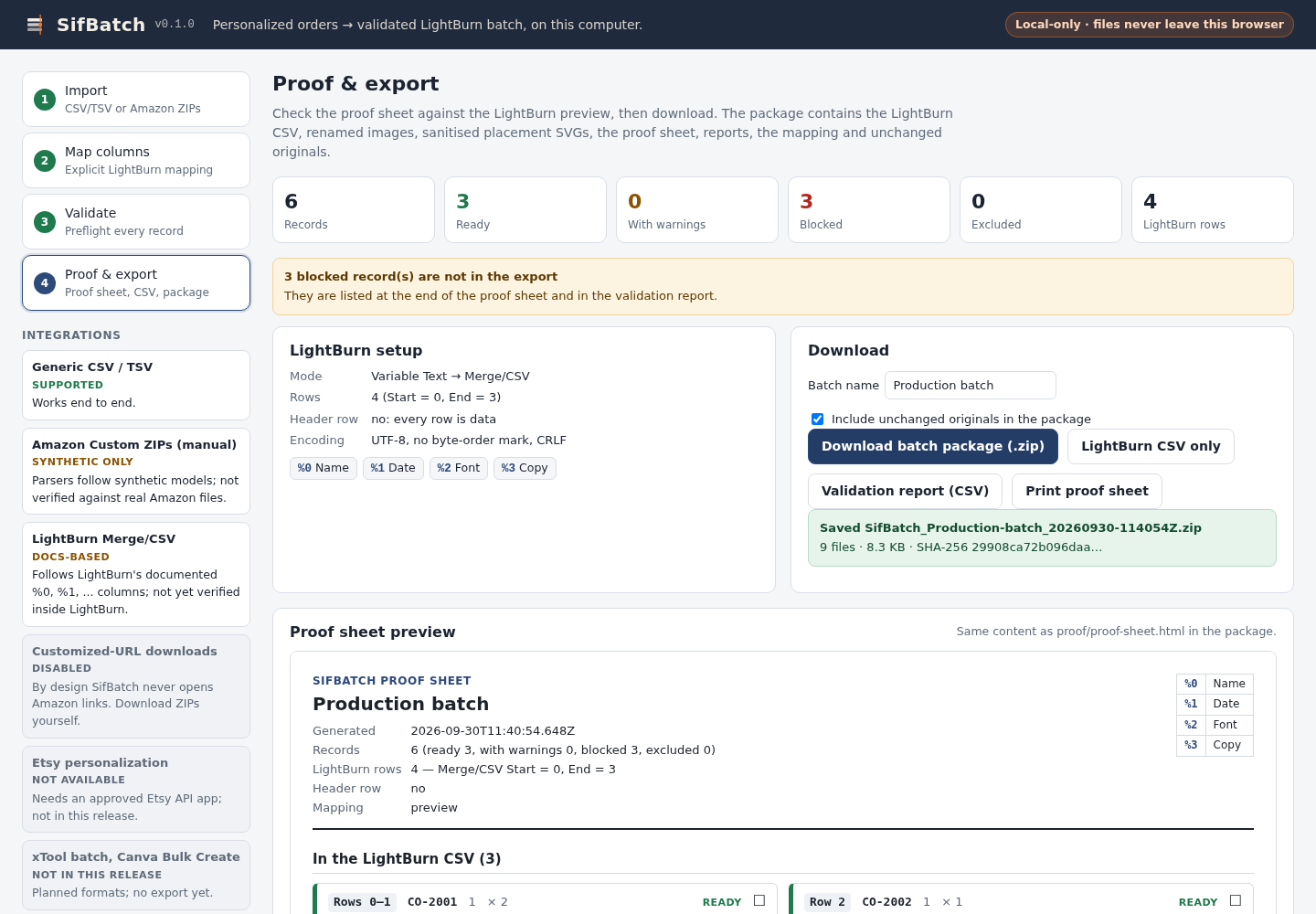
Validate shows 6 records: 3 ready, 0 with warnings, 3 blocked, 4 LightBurn rows. Blocked reasons: “"Name" has 35 characters; the limit is 20.”, the formula rule for =1+1 (“"Name" starts with a spreadsheet formula character …”), and “"Name" is empty.” The CSV (SifBatch_Production-batch_lightburn-merge.csv) has 4 lines, the two-coaster order expanded to copies 1/2 and 2/2: “Hanna & Theo,21.06.2026,Great Vibes,1/2”. The batch ZIP contains lightburn/merge.csv, lightburn/COLUMNS.txt, proof/proof-sheet.html, reports/validation-report.csv and .json, mapping/sifbatch-mapping.json, originals/coaster-orders.csv, README.txt and manifest.json.
Download guide & practice files (ZIP)
Examples use fictional or synthetic data. Follow this example step by step.
How it works
Buy, download and extract
Buy from /store/sif-batch/ and download sif-batch-0.1.0.zip from the checkout page. Extract it; you get a folder named sif-batch with server.mjs, the app, synthetic samples and README.txt.
Start SifBatch
Open a terminal in the sif-batch folder and run: node server.mjs. It prints “SifBatch is running at http://127.0.0.1:8787/ (loopback only; press Ctrl+C to stop)”. Open that address in Chrome. Keep the terminal open while you work; press Ctrl+C there when you are done. If port 8787 is busy, start it with node server.mjs --port 8790 and open that port instead.
Try the synthetic sample first (optional)
On the Import step, click “Generic CSV sample”. It loads invented orders together with a saved mapping so you can walk through all four steps safely.
Before you buy
- Node.js 20.12 or newer (to start the local server) and desktop Google Chrome.
- Your orders as a CSV, TSV or TXT file with column names in the first row and one row per personalized item.
- Optional: buyer images as image files or a ZIP of images (PNG, JPEG, GIF, WEBP, BMP), matched by file name.
Extract the ZIP; with Node.js 20.12+ run node server.mjs, then open its local address in desktop Chrome.
Compatibility & limits
Chrome 152, Node 22 and synthetic data were tested. LightBurn import has not been verified; confirm the CSV in LightBurn preview before production. Amazon Custom readers are synthetic models only: real Amazon compatibility is unverified. No xTool, Canva or Etsy export.
Get SifBatch
Perpetual use of the purchased version on your devices for personal or internal commercial work. Keep reasonable backups and modify your own copy; do not redistribute or resell original proprietary code. Third-party licenses and any existing preview permissions retain their rights.
Before payment, save the private recovery code shown by checkout. After Paddle confirms payment, use it to download your ZIP or return for it later. No subscription, future update or email delivery is promised. See the illustrated steps.
$19 USD · once
Buy download