Local download
VesnaLessons
Build and review a weekly private-lesson schedule offline.
You teach individual lessons (music, tutoring and similar) and need to fit every student into the week around their availability, sibling wishes, breaks and locations.
$29 USD · one-time purchase
Continue to checkoutStep-by-step guide
No subscription. Final total and tax appear at checkout.
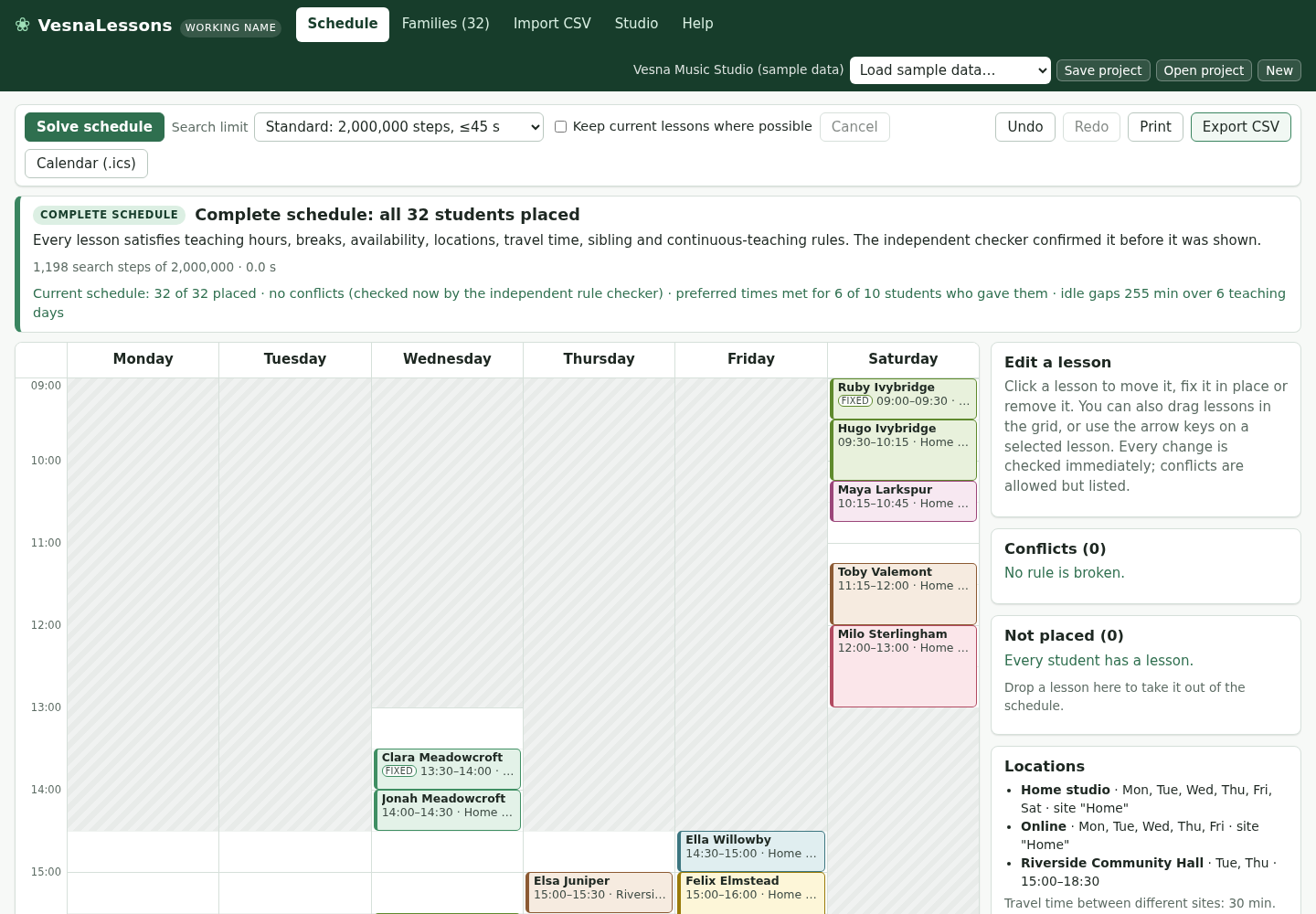
What it helps you do
Import a roster and availability CSV, set studio rules, solve or edit the schedule, then export CSV, ICS, per-family ZIP or print/PDF.
What is in your download
- The complete tool for the workflow described here.
- Installation instructions and included license notices.
A practical example
Six fictional piano students in the sample studio
Start with
examples/vesna-lessons/piano-studio-families.csv: 6 fictional students in 5 families (Family, Child, Minutes, Where, availability text, best times, a kept Monday 16:00 slot for one returning student, siblings together). It uses the sample studio's teaching hours and its “Home studio” location.
Get this result
The banner reads “Complete schedule: all 6 students placed”, Conflicts (0) and “Not placed (0)”. Monday: Noah Copperfield 16:00–16:30 (FIXED), Emma Ashgrove 16:30–17:00 and Liam Ashgrove 17:00–17:30 back-to-back; Tuesday: Sofia Brookfield 17:30–18:15; Wednesday: Oliver Elderby 16:00–16:30; Thursday: Mia Dunlin 17:30–18:30. The CSV has one row per lesson (Status, Day, Start, End, Minutes, Student, Family, Location, Fixed, …). The ZIP contains Ashgrove.ics, Brookfield.ics, Copperfield.ics, Dunlin.ics and Elderby.ics with weekly events until 18 December and 26 October skipped. File names start with the studio name, here “Vesna-Music-Studio-sample-data”, until you rename the studio on the Studio tab.
Download guide & practice files (ZIP)
Examples use fictional or synthetic data. Follow this example step by step.
How it works
Buy, download and open
Buy from /store/vesna-lessons/ and download vesna-lessons-0.1.1.zip from the checkout page. Extract it and open vesna-lessons/index.html in Chrome. The first time, it opens a fictional 32-student sample studio; press “Solve schedule” to see how it works. Later it opens your last project from the browser; use “Load sample data…” to see the samples again.
Set up your studio
On the Studio tab enter Studio name, Teacher and “Lesson name in calendars”, the time display, the grid step for lesson start times, default lesson length and sibling default. Under “Teaching hours” tick your teaching days with From and To times, add Breaks, set the Rules (maximum continuous teaching, minimum break, travel time between sites) and list your Locations. Click “New” first if you want to start from an empty project instead of the sample settings.
Import families
On the Import CSV tab click “Choose CSV file…” (or “Use pasted text”). In “2. Match the columns” check which column is “Student name(s)” (required), family, email, lesson length, location, availability, preferred times, fixed lesson time and siblings; columns with matching names are picked automatically. “3. Preview” lists every student with warnings. Choose the Import mode — “Replace all families and students (settings and locations stay)” or “Add to the current families” — and click “Import … students”, or “Discard”.
Before you buy
- Desktop Google Chrome.
- Families' availability as a CSV file, for example a Google Forms or Microsoft Forms response export or your own spreadsheet with a student name column and availability text such as “Mon 15:30-18:00; Wed 15:30-18:00”.
Extract the ZIP and open index.html in desktop Google Chrome. Start with the fictional 32-student studio.
Compatibility & limits
One teacher and one lesson per student per week; at most five siblings in the back-to-back rule. Calendar times are floating local times. Chrome 152 on Linux and synthetic data were tested. Real form exports, calendar imports, other browsers and physical printing are unverified. Search can reach its limit without a complete answer.
Get VesnaLessons
Perpetual use of the purchased version on your devices for personal or internal commercial work. Keep reasonable backups and modify your own copy; do not redistribute or resell original proprietary code. Third-party licenses and any existing preview permissions retain their rights.
Before payment, save the private recovery code shown by checkout. After Paddle confirms payment, use it to download your ZIP or return for it later. No subscription, future update or email delivery is promised. See the illustrated steps.
$29 USD · once
Buy download