Task walkthrough · MuninCompare
Compare two HAR files to find GA4 and Adobe Analytics changes after a release
A frontend release can quietly drop an analytics event, change a parameter or fire a tag twice. Record the same journey before and after the change, compare the two HAR files on your own computer and review only what changed.
A Perunlight product workflow for MuninCompare, our paid Chrome extension. Written with AI assistance and checked against the accepted MuninCompare 1.0.1 test run (Chrome for Testing 151 on Linux, fictional HAR files). Published .
When a before/after comparison helps
Use it when a change could touch tracking although nobody meant to change analytics: a redesign, a checkout refactor, a consent banner update or a tag manager clean-up. You want a short list of differences to review, not every request the page made.
MuninCompare reads the standard GA4 and Adobe Analytics collection requests in two HAR files, groups them by event and reports what was removed, added, changed or repeated. Other traffic is counted but not analysed.
Capture two comparable journeys
- Pick one short, scripted journey on a site you are authorised to test, for example home, product page, add to cart, basket. Use a test account and test data.
- In Chrome, open DevTools, select the Network panel and tick Preserve log so requests are kept across page loads. Walk the journey on the current build.
- Save the capture with Export HAR (sanitized). According to Chrome’s DevTools documentation, the sanitized export leaves out the
Cookie,Set-CookieandAuthorizationheaders. - Repeat exactly the same journey on the new build, with the same consent choices and the same browser profile, and export a second HAR.
- Name the files so they cannot be swapped, for example
checkout-before.harandcheckout-after.har.
The comparison is only as good as the two journeys. MuninCompare cannot tell whether they were equivalent: an extra click or a different consent choice shows up as a difference the release did not cause.
Treat HAR files as sensitive
A HAR file records what the browser sent and received. Even a sanitized export can still contain full URLs and query strings, form fields, response bodies and analytics parameters that identify a person. Store it like any other sensitive file and delete it when you are done.
MuninCompare reads the files in its own tab, in memory. The extension has no permissions or host access and makes no network requests. While parsing, it discards headers, cookies, response bodies, the bodies of non-analytics requests and full URLs. A report leaves the tab only when you press Download, and by default contains counts, redacted event names, parameter names and changed/unchanged markers.
Redaction replaces common identifiers such as e-mail addresses, URLs, tokens, UUIDs and client IDs, but it cannot recognise every kind of personal data, for example a name inside a page title or a custom eVar. It is not anonymisation: review every report before you share it.
Read the comparison
- Removed: an event fired before the change and not after. The most likely sign of a broken tag, so review these first.
- Added: an event that only fires after the change. Expected if the release added tracking; otherwise find out where it came from.
- Changed: the same event with a different parameter value or a different number of occurrences. Explain shows what differs.
- Repeated: identical occurrences of one event in a capture, a possible double firing.
- Unchanged: the same events with the same compared values.
- Coverage: what was not analysed. Adobe Target, Adobe Web SDK and requests to custom collection domains are listed as unsupported, and ordinary page traffic is counted as unrecognised. Unsupported does not mean clean.
Volatile values such as client and session IDs, timestamps and cache busters are ignored, and so is the order of requests. Two runs of the same journey can therefore come out unchanged.
Worked example: a fictional checkout journey
MuninCompare includes fictional HAR files for an invented shop, Northwind Tea, on the reserved domain tea.example.com. The before file records home, product, add to cart and basket: 18 requests, including GA4, Adobe Analytics, Adobe Target, a server-side style GA4 request, a look-alike host and ordinary page requests. The after file records the same journey after a fictional tag change.
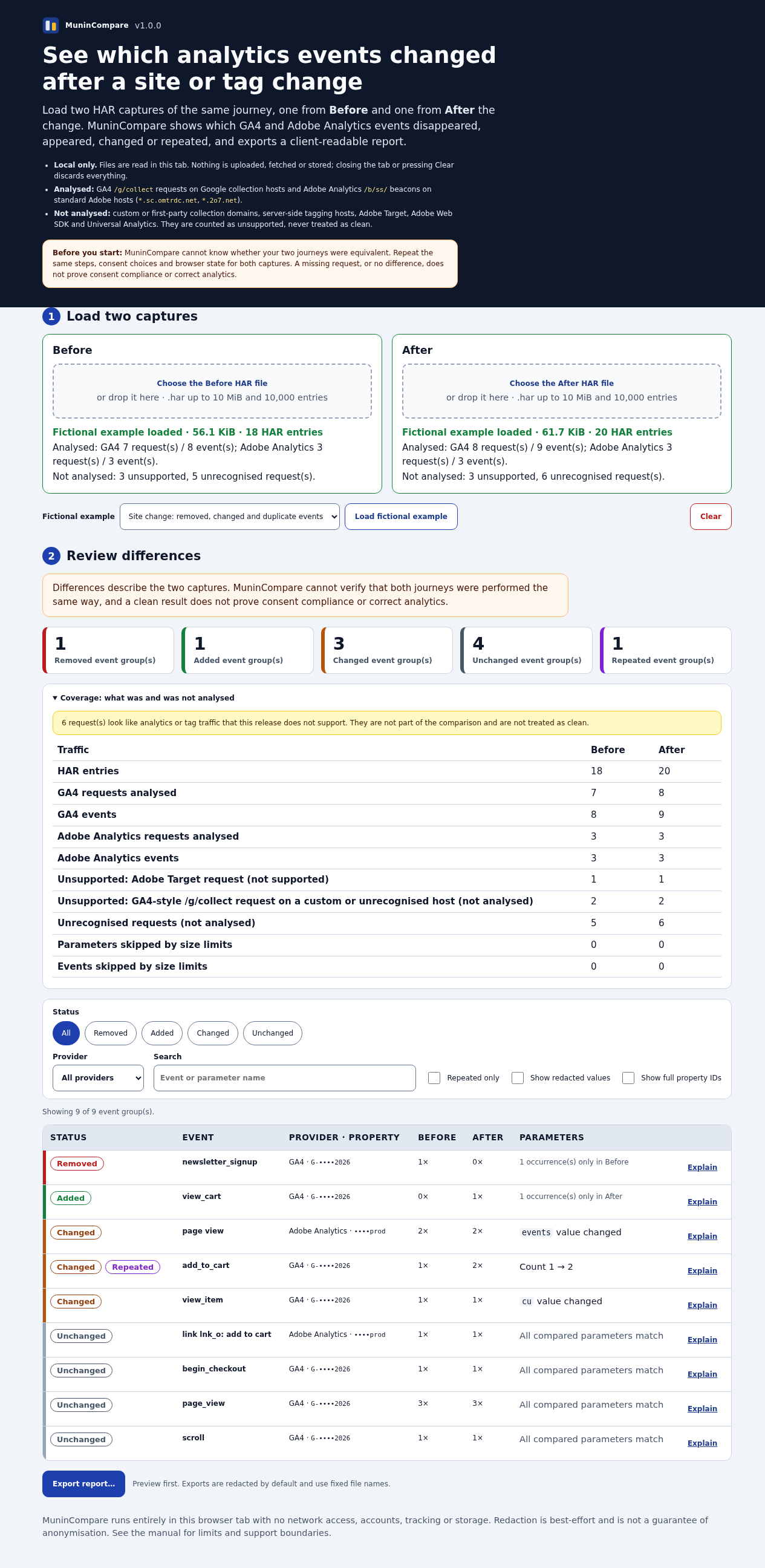
What the comparison reports
- Removed 1: GA4
newsletter_signupfired before the change, not after. - Added 1: GA4
view_cartfired only after the change. - Changed 3: GA4
view_item(the currency parametercuchanged; with redacted values shown, EUR → USD), GA4add_to_cart(one occurrence became two) and an Adobe page view whoseeventsvalue changed on the product page. - Repeated 1:
add_to_carthas two identical occurrences in the after capture, a possible double firing. - Unchanged 4: GA4
page_view,scrollandbegin_checkout, and the Adobe add-to-cart link call. - Coverage: in each capture, one Adobe Target request and two GA4-style requests on non-standard hosts are listed as unsupported and not analysed; ordinary page requests are counted as unrecognised (5 before, 6 after).
Client IDs, session IDs, timestamps, cache busters and the order of requests differ between the two files and did not become differences. A second fictional pair records the same journey twice with new volatile values in a different order: all 8 event groups come out unchanged.
Result in the accepted 1.0.1 test run: for the changed pair, removed 1, added 1, changed 3, unchanged 4 and repeated 1; for the reordered identical pair, no differences. The redacted HTML report opens offline and contains no scripts.
Work through the results in this order
- Removed events: likely regressions.
- Changed parameters on key events such as add to cart, sign-up or purchase.
- Repeated events: possible double counting.
- Added events: confirm someone meant to add them.
- Coverage: anything unsupported needs a separate check.
Common mistakes
- Comparing different journeys. Different pages, clicks or consent choices create differences the release did not cause.
- Capturing with blocking extensions on. A blocked collection request looks like a removed event. Use the same clean test profile for both captures.
- Sharing the raw HAR. Share the reviewed report instead, and only with people entitled to see the analytics data.
- Reading “no differences” as “tracking is correct”. The comparison shows change, not correctness or consent compliance.
- Ignoring coverage. Server-side tagging hosts, Adobe Web SDK and Adobe Target are not analysed; check them another way.
Free and manual alternatives
- Chrome DevTools on its own: filter the Network panel to your analytics requests and read each payload in both builds. Fine for one or two events; slow and easy to get wrong for a whole journey.
- GA4 DebugView: Google’s DebugView shows the events and user properties Analytics collects from a device in debug mode, in real time. It helps while you test one build, but it is not a before/after comparison.
Limits and next steps
- MuninCompare is installed as an unpacked extension in Chrome with Developer mode on. It is not a Chrome Web Store listing, and a managed browser policy may block it.
- It was tested in Chrome for Testing 151 on Linux with fictional HAR files. Other browsers, other operating systems, real customer journeys and HAR exports from your own sessions were not part of that test.
- Only standard GA4 and Adobe Analytics collection requests are analysed. Adobe Web SDK, Adobe Target and custom collection domains are counted as unsupported.
- It does not capture traffic, connect to analytics services, certify tracking or consent, or prove that two journeys were equivalent.
Next: if you have MuninCompare, load the fictional pair first to see the result format, then capture one short authorised journey before and after your next release. The MuninCompare setup guide covers installation, loading files and exports.
Perunlight product
Compare your own captures with MuninCompare
MuninCompare is a paid Chrome extension: $39 USD, one-time purchase, version 1.0.1, installed unpacked rather than from the Chrome Web Store. It compares two local HAR files and exports redacted HTML, CSV or JSON reports. Tested in Chrome for Testing 151 on Linux.
Get MuninCompare · $39Read the setup guide
The free ZIP lets you read the manual and inspect the fictional HAR files; the comparison itself needs the paid extension.