Step-by-step guide
Svarn Audit Pack
Check a Svarn PNG export before handing it over or comparing versions. Check schema-1 manifest entries, PNG structure and SHA-256 hashes; report added, removed or byte-changed PNGs across exports.
You exported sprite slices with the Svarn Aseprite extension and want an independent check before handing the folder to someone else, or you want to see exactly which PNGs changed between two exports.
Before you start
- Python 3.10 or newer, run from a terminal.
- An export folder from the Svarn Aseprite extension (schema 1): it contains svarn-manifest.json next to the PNG files. Svarn and Aseprite are separate downloads and are not included.
- The Svarn Audit Pack ZIP from your purchase (see the Buying and downloading guide).
Your first result
Buy, download and extract
Buy from /store/svarn-audit-pack/ and download svarn-audit-pack-0.1.0.zip from the checkout page. Extract it; you get a folder named svarn-audit-pack containing audit.py, README.txt and license files. Nothing is installed and no extra Python packages are needed.
Export with the Svarn extension
In Aseprite, export your slices with Svarn as usual. Keep the export folder as Svarn wrote it: svarn-manifest.json plus the PNG files, with no extra PNGs added by hand.
Check one export
Open a terminal in the svarn-audit-pack folder and run: python3 audit.py /path/to/svarn-export. A passing folder prints JSON with "status": "verified", the number of files and a SHA-256 value per PNG, and the command exits with code 0.
Compare two exports
Run: python3 audit.py /path/to/old-export --compare /path/to/new-export. Both folders are checked first; the output then adds a "comparison" section listing "added", "removed" and "changed" PNG names. "changed" means the file bytes differ, not that the pixels were inspected.
Read a failure
If anything is wrong the tool prints one line starting with AUDIT FAILED: and the reason (for example "PNG CRC mismatch", "PNG dimensions differ from manifest", "unlisted PNG in export folder" or "Svarn export is incomplete"), and exits with code 1. Re-export with Svarn and run the check again.
Keep the result
The tool only reads files and prints to the terminal; it never modifies your export and saves nothing by itself. To keep a record, redirect the output to a file, for example: python3 audit.py my-export > audit-result.json
A worked example
Pond sprites: a clean export, a changed export and a damaged copy
Input: examples/svarn-audit-pack/ contains three small fictional folders laid out like a Svarn schema-1 export (16×16 PNG squares, not real artwork): export-v1 (frog_1, frog_2, lily_1), export-v2 (frog_2 recoloured, lily_1 removed, dragonfly_1 added) and export-damaged (a copy of export-v1 with one byte flipped inside lily_1.png).
- In a terminal, change into the extracted svarn-audit-pack folder.
- Run: python3 audit.py /path/to/examples/svarn-audit-pack/export-v1
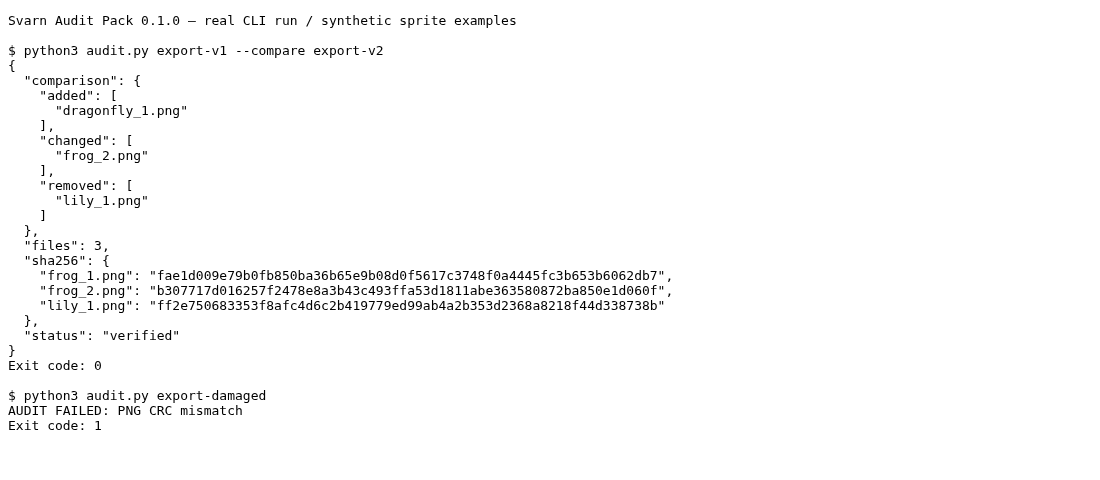
- Run: python3 audit.py /path/to/examples/svarn-audit-pack/export-v1 --compare /path/to/examples/svarn-audit-pack/export-v2
- Run: python3 audit.py /path/to/examples/svarn-audit-pack/export-damaged
Expected result: 1) "status": "verified" with "files": 3 and exit code 0. 2) Also verified, plus "comparison": added ["dragonfly_1.png"], changed ["frog_2.png"], removed ["lily_1.png"]. 3) AUDIT FAILED: PNG CRC mismatch, exit code 1.
Troubleshooting
AUDIT FAILED: [Errno 2] No such file or directory: '.../svarn-manifest.json'
The path does not point at a Svarn export folder. Point the command at the folder that directly contains svarn-manifest.json.
AUDIT FAILED: unlisted PNG in export folder
A PNG in the folder is not listed in the manifest (for example a file copied in by hand or left over from an older export). Export into an empty folder and check again.
AUDIT FAILED: not a supported Svarn manifest, or Svarn export is incomplete
Only complete schema-1 manifests written by Svarn are accepted. Re-run the export in Svarn and resolve any failures it reports first.
AUDIT FAILED: unsupported PNG geometry or format
Only 8-bit, non-interlaced RGB, indexed or RGBA PNGs are supported, which is what the Svarn extension writes.
python3: command not found
Install Python 3.10 or newer. On some systems the command is python instead of python3 (other platforms were not tested).
Compatibility & limits
- Checks PNG structure, compressed data, row filters and SHA-256 hashes; it does not fully decode pixels or compare them with the Aseprite source file.
- Tested with one saved Aseprite export on Linux (ordinary, corrupt, changed and missing-file cases); other platforms are untested.
- Terminal only: there is no window or graphical interface.
- Separate paid tool: the Svarn Aseprite extension keeps working the same with or without it.
Need a hand?
Tell us the product, host application and version, what you tried, and the exact error. Contact support with a fictional example; keep private customer files and passwords out of your message.
Start with the free Svarn exporter
The Aseprite extension exports your slices and creates the manifest that Audit Pack checks. Download and try that exporter first. Aseprite is licensed separately; Audit Pack is optional.
Download the exporter and follow its guide