Local download
Svarn Audit Pack
Check a Svarn PNG export before handing it over or comparing versions.
You exported sprite slices with the Svarn Aseprite extension and want an independent check before handing the folder to someone else, or you want to see exactly which PNGs changed between two exports.
$9 USD · one-time purchase
Continue to checkoutStep-by-step guide
No subscription. Final total and tax appear at checkout.
What it helps you do
Check schema-1 manifest entries, PNG structure and SHA-256 hashes; report added, removed or byte-changed PNGs across exports.
What is in your download
- The complete tool for the workflow described here.
- Installation instructions and included license notices.
A practical example
Pond sprites: a clean export, a changed export and a damaged copy
Start with
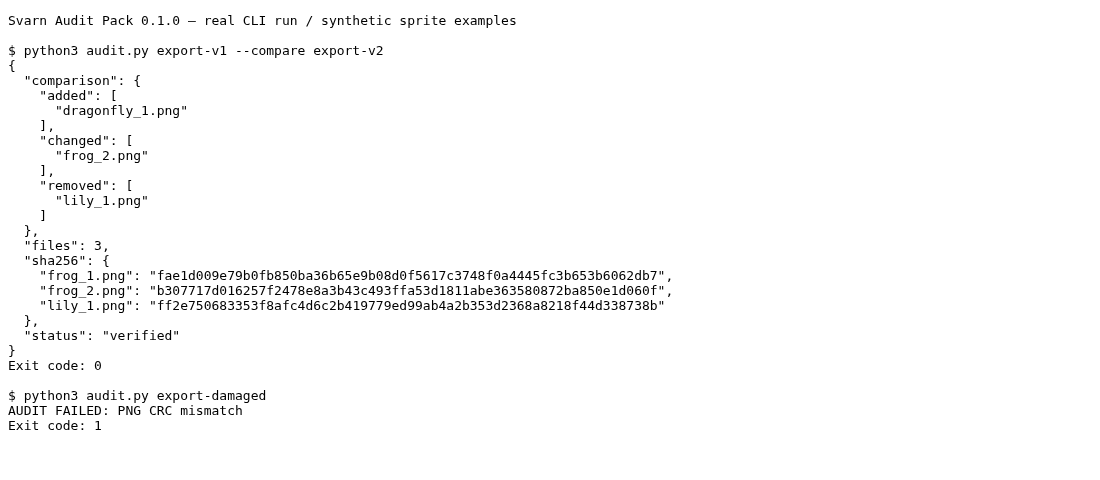
examples/svarn-audit-pack/ contains three small fictional folders laid out like a Svarn schema-1 export (16×16 PNG squares, not real artwork): export-v1 (frog_1, frog_2, lily_1), export-v2 (frog_2 recoloured, lily_1 removed, dragonfly_1 added) and export-damaged (a copy of export-v1 with one byte flipped inside lily_1.png).
Get this result
1) "status": "verified" with "files": 3 and exit code 0. 2) Also verified, plus "comparison": added ["dragonfly_1.png"], changed ["frog_2.png"], removed ["lily_1.png"]. 3) AUDIT FAILED: PNG CRC mismatch, exit code 1.
Download guide & practice files (ZIP)
Examples use fictional or synthetic data. Follow this example step by step.
How it works
Buy, download and extract
Buy from /store/svarn-audit-pack/ and download svarn-audit-pack-0.1.0.zip from the checkout page. Extract it; you get a folder named svarn-audit-pack containing audit.py, README.txt and license files. Nothing is installed and no extra Python packages are needed.
Export with the Svarn extension
In Aseprite, export your slices with Svarn as usual. Keep the export folder as Svarn wrote it: svarn-manifest.json plus the PNG files, with no extra PNGs added by hand.
Check one export
Open a terminal in the svarn-audit-pack folder and run: python3 audit.py /path/to/svarn-export. A passing folder prints JSON with "status": "verified", the number of files and a SHA-256 value per PNG, and the command exits with code 0.
Before you buy
- Python 3.10 or newer, run from a terminal.
- An export folder from the Svarn Aseprite extension (schema 1): it contains svarn-manifest.json next to the PNG files. Svarn and Aseprite are separate downloads and are not included.
- The Svarn Audit Pack ZIP from your purchase (see the Buying and downloading guide).
Extract the ZIP; with Python 3.10+ run python3 audit.py /path/to/svarn-export. Svarn and Aseprite are separate.
Compatibility & limits
A saved four-PNG Linux Aseprite export passed the ordinary, corrupt, changed and missing cases. The tool does not fully decode pixels or compare with the Aseprite source. Other platforms and customer workflows are untested.
Start with the free Svarn exporter
The Aseprite extension exports your slices and creates the manifest that Audit Pack checks. Download and try that exporter first. Aseprite is licensed separately; Audit Pack is optional.
Download the exporter and follow its guideGet Svarn Audit Pack
Perpetual use of the purchased version on your devices for personal or internal commercial work. Keep reasonable backups and modify your own copy; do not redistribute or resell original proprietary code. Third-party licenses and any existing preview permissions retain their rights.
Before payment, save the private recovery code shown by checkout. After Paddle confirms payment, use it to download your ZIP or return for it later. No subscription, future update or email delivery is promised. See the illustrated steps.
$9 USD · once
Buy download