Optional tool + guide bundle
Svarn
Export Aseprite slices and frames with a checked manifest.
You keep icons, tiles or UI parts as slices in one Aseprite document and want each slice written as its own PNG, per frame, with predictable names, a new folder per run and a manifest that says what was written and verified.
$9 USD · one-time purchase
Continue to checkoutStep-by-step guide
No subscription. Final total and tax appear at checkout.
Download free exporter (ZIP). The exporter is free under its included permissions. This optional $9 purchase puts the same exporter, guide and practice files into one prepared ZIP. It adds no exporter features and does not include the separate Svarn Audit Pack.
What it helps you do
Export saved Aseprite slices across frames into PNGs with a manifest of dimensions and file hashes for a clear handoff.
What is in your download
- The original tool ZIP, preserved inside the download bundle.
- Installation and first-result instructions.
- A worked example and the included license notices.
A practical example
Export two pickup icons
Start with
examples/svarn/pickups.png (a fictional 32 × 16 image with a coin and a gem) and examples/svarn/slices.csv, which lists the two slices to draw: coin at x 0, y 0, 16 × 16 and gem at x 16, y 0, 16 × 16.
Get this result
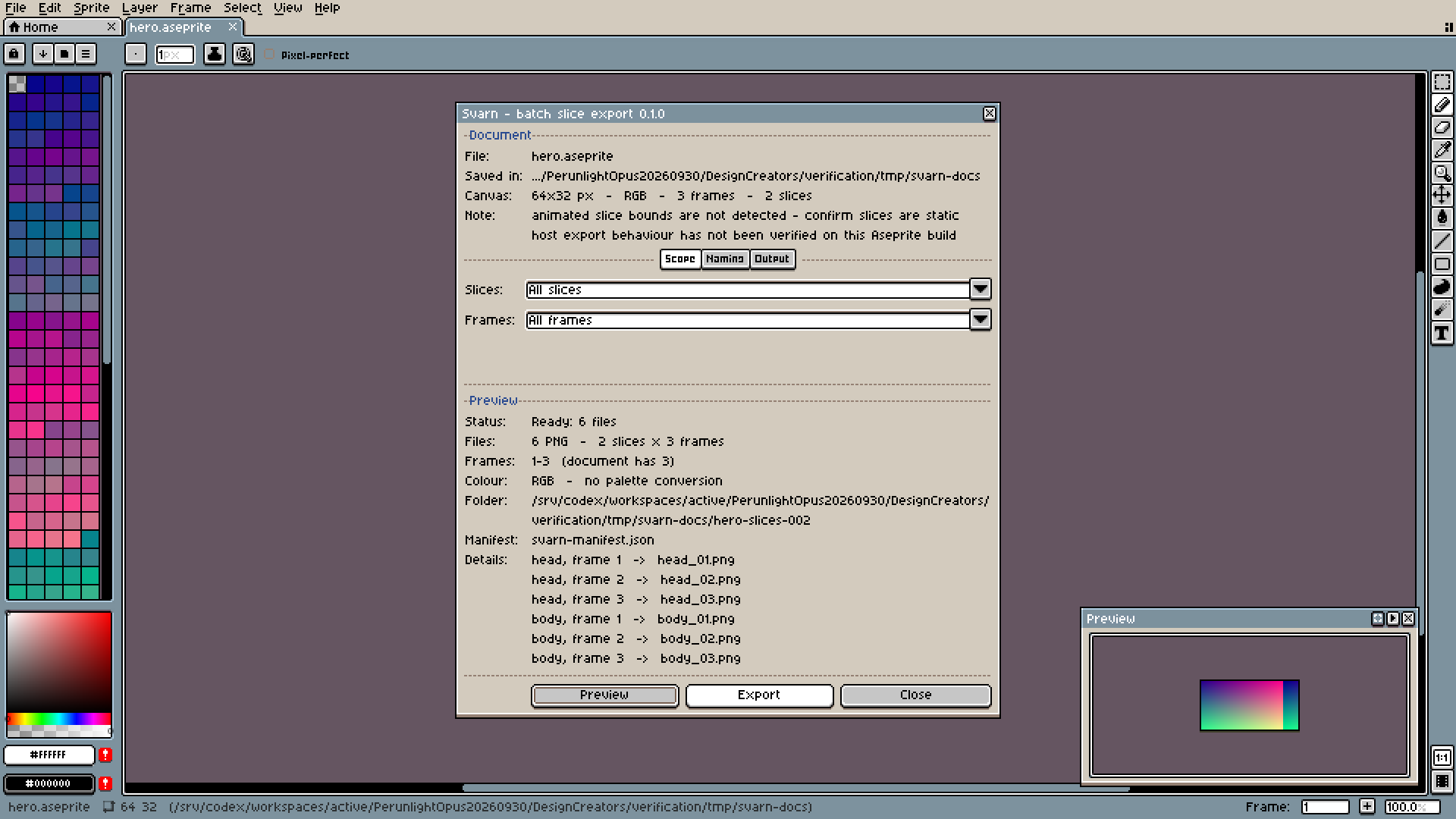
Preview plans 2 PNG files (coin, frame 1 -> coin_01.png and gem, frame 1 -> gem_01.png). Export creates a folder pickups-slices-001 next to pickups.aseprite containing coin_01.png and gem_01.png (16 × 16 each) and svarn-manifest.json with status complete; the Status row reads Exported and verified 2 of 2 files in pickups-slices-001. Exporting again creates pickups-slices-002 instead of overwriting.
Download guide & practice files (ZIP)
Examples use fictional or synthetic data. Follow this example step by step.
How it works
Get the exporter and practice files
Download the free exporter using the button above and extract svarn-preview-20260929.zip. Download the guide & practice files ZIP from Worked example below and extract it separately. If you bought the optional guide bundle instead, extract svarn-0.1.1-guide-bundle.zip, then its program/svarn-preview-20260929.zip. Either way, app/, extension/, samples/ and docs/ below refer to the extracted program folder. The paid bundle puts the same exporter, guide and practice files into one prepared download; it does not add exporter features.
Install the extension
In Aseprite open Edit › Preferences › Extensions › Add Extension…, choose app/svarn-0.1.0.aseprite-extension, and restart Aseprite if asked. The command Svarn: Batch Export Slices... then appears in the File menu, just below the Export submenu.
Prepare the sprite
Open the sprite, make sure its slices are where you want them, and save it (File › Save). Svarn refuses unsaved documents. If you use Save As, open Svarn again afterwards so it follows the new file.
Before you buy
- Aseprite 1.3, installed and licensed separately. Checked with Aseprite 1.3.18.6-dev on Linux; other versions and Windows or macOS are not checked yet.
- A document saved to disk, with at least one rectangular slice inside the canvas. Animated slice bounds are not detected.
- RGB or Indexed colour mode. Grayscale is not supported.
- The free svarn-preview-20260929.zip exporter, or the optional paid svarn-0.1.1-guide-bundle.zip package. Both contain the same exporter; payment is not required to export slices.
Extract the inner preview ZIP. In Aseprite 1.3 open Edit > Preferences > Extensions > Add Extension and select app/svarn-0.1.0.aseprite-extension; restart. Open a saved RGB or Indexed document with static rectangular slices, then use File > Svarn: Batch Export Slices.
Compatibility & limits
Aseprite licensed separately. Linux 1.3.18.6-dev GUI verified; Windows, macOS, large projects and upgrades unverified. No grayscale or animated slice bounds.
Try it first
The exporter is free under its included permissions. This optional $9 purchase puts the same exporter, guide and practice files into one prepared ZIP. It adds no exporter features and does not include the separate Svarn Audit Pack.
Download free exporter (ZIP)Need to check a handoff or compare two exports?
Svarn Audit Pack is a separate $9 tool for checking saved export folders. It checks the manifest, PNG structure and file hashes, then reports added, removed or byte-changed PNGs between versions. It runs from a terminal with Python 3.10+. It does not compare artwork visually and is not required to export with Svarn.
See Svarn Audit Pack · $9 onceGet Svarn
Perpetual use of the purchased version on your devices for personal or internal commercial work. Keep reasonable backups and modify your own copy; do not redistribute or resell original proprietary code. Third-party licenses and any existing preview permissions retain their rights.
Before payment, save the private recovery code shown by checkout. After Paddle confirms payment, use it to download your ZIP or return for it later. No subscription, future update or email delivery is promised. See the illustrated steps.
$9 USD · once
Buy download