Practical check · audio and photos
Check what changed in a delivery copy
A metadata edit should change a file without changing the sound or picture you meant to deliver. A matching filename cannot prove that. Compare the original, the media and the written notices as separate checks.
Written with AI assistance by Perunlight, maker of the paid ZoryaTag and VarSeal apps. Checked against the public fictional practice packs on 3 October 2026 with independent hash, JPEG pixel and XMP checks. Lumen Harbor and Harbor Studio are invented examples. Published .
Start with four questions
- Which original did this copy come from? Compare the recorded source SHA-256 with the actual source file.
- Did the media stay the same? Check the audio payload or decoded pixels separately from the complete file.
- What metadata was added, retained or replaced? Read the final values, including older fields that may disagree.
- Which inputs produced no output? Reconcile refused and skipped inputs instead of counting only successful copies.
A SHA-256 is a fingerprint of bytes. Adding a copyright notice changes the whole-file fingerprint, even if the JPEG image or audio payload is unchanged. A receipt connects the source and output fingerprints. It does not become independent evidence simply because its own fields agree.
Original file → source SHA-256
Delivery copy → output SHA-256
(usually different)

Then check separately:
audio payload or decoded pixels
metadata values
refused and skipped inputs
Read the nine audio records honestly
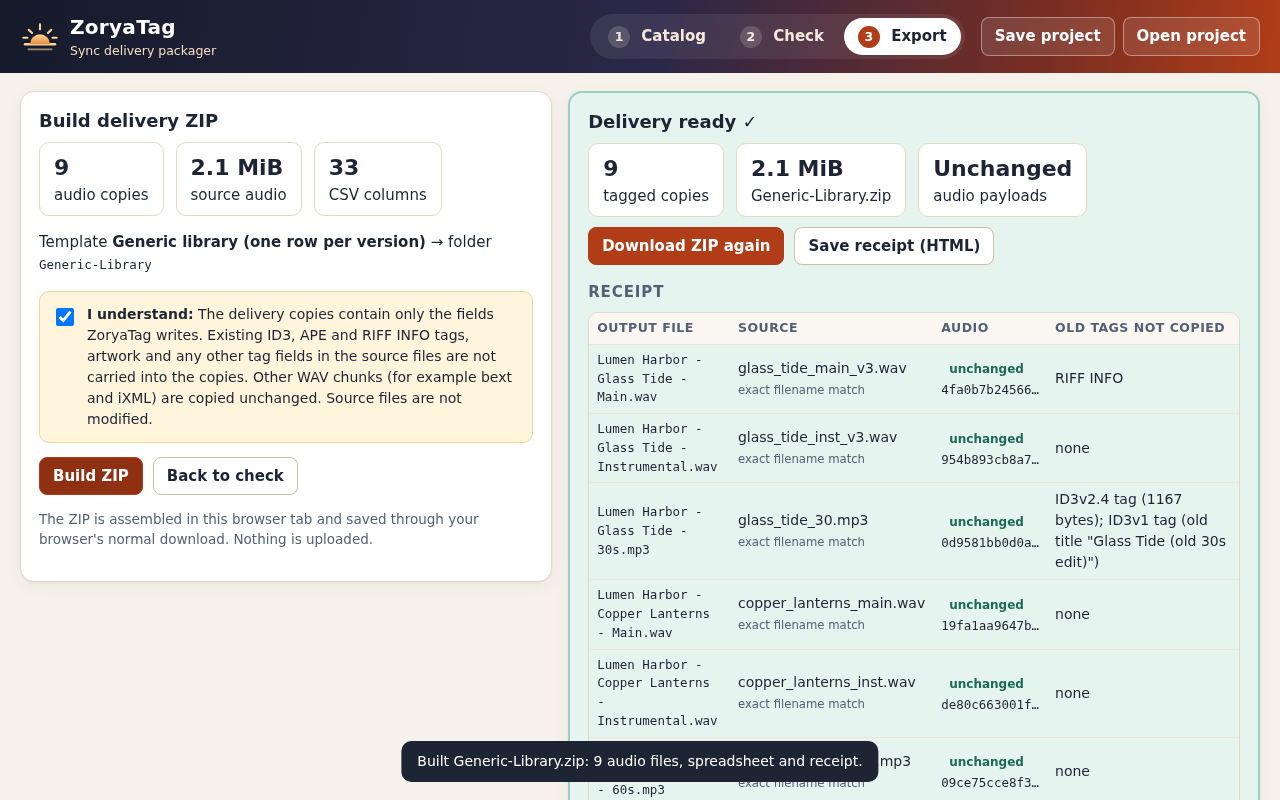
Extract the ZoryaTag pack. In examples/expected/receipt.json, each record names a source, an output and their whole-file and payload hashes. There are nine records for three fictional Lumen Harbor tracks with three versions each. Generic-Library-metadata.csv also has nine data rows.
For the WAV sources, the independent check hashed the RIFF data chunk. For the supplied MP3 sources, it hashed the remaining MPEG audio bytes after the leading ID3v2 tag and trailing ID3v1 tag where present. All nine source-file and source-payload hashes matched the receipt. This describes these fixtures; it is not a universal parser for arbitrary audio files.
Verified from the free audio pack: nine actual source files match their recorded source and payload hashes; the expected metadata CSV has nine rows.
The receipt reports unchanged output payloads for all nine records. You cannot independently compare those outputs using this free pack because it does not include the processed audio. To check your own paid-app export, keep both original and output files and recompute both sides.
Compare the seven actual JPEG pairs
- Extract the VarSeal practice ZIP. Original images are in practice-input; processed copies are in expected-output/photos.
- Open expected-output/VarSeal-receipt.json or the CSV. Seven inputs are written, two are blocked and one text file is skipped.
- Match each written JPEG to the original with the same name. Recompute source and output SHA-256 values if you have a hashing utility.
- Compare decoded pixels with an image comparison tool. In this check, ImageMagick reported zero differing pixels for every one of the seven pairs.
- Inspect the XMP values in the output and compare them with the receipt. The independent check also matched all five reported properties for each written JPEG.
Written JPEG pairs:      7
Pixel difference:        0 for every pair
Blocked JPEG inputs:     2
Skipped text input:      1
Total input entries:    10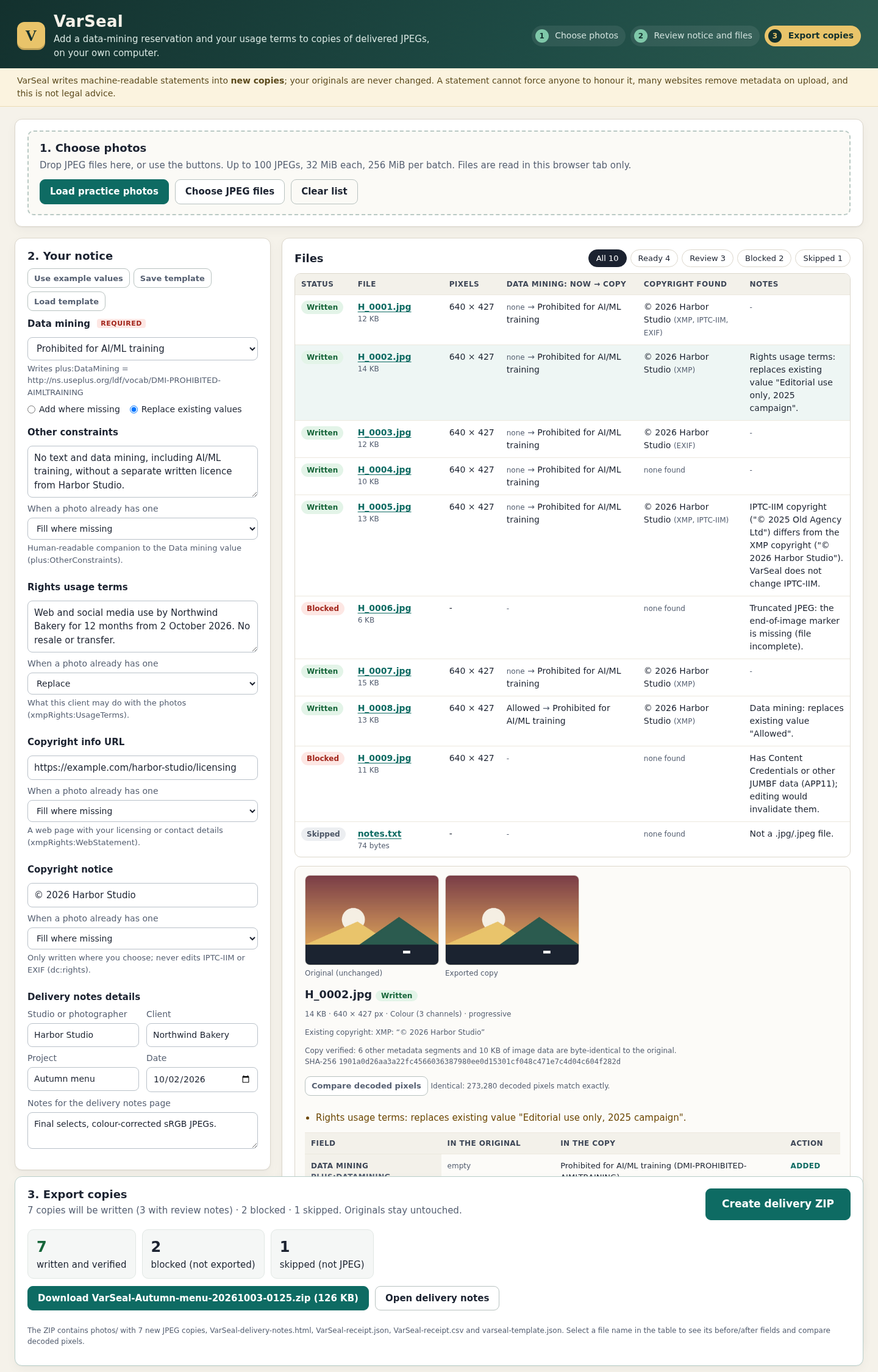
The damaged H_0006.jpg and the JUMBF-bearing H_0009.jpg are blocked; notes.txt is skipped. The independent pixel comparison used the same ImageMagick decoder for each original/output pair. It does not establish identical behavior in every photo editor.
Check replacement choices and older notices
In H_0002.jpg, the example replaces an older usage statement. In H_0008.jpg, it replaces a previous Data Mining setting. Read these as deliberate changes requiring review, not merely green success counts.
H_0005.jpg illustrates a different issue: its older IPTC-IIM copyright can remain while XMP carries another value. VarSeal writes selected XMP properties and leaves existing IIM and EXIF unchanged. A reader may show a different field, so preserve and review the conflict warning.
The PLUS Data Mining value is a metadata notice. It does not stop downloading or AI training, and it does not establish ownership or licensing rights. Include plain delivery instructions and review your agreement as well as the embedded fields.
Use the same checks on your own delivery
- Keep your original files unchanged and retain the exact source set used for this delivery.
- Review overwrites before export, including fields that are discarded or retained.
- Keep the output copies, metadata CSV where applicable and receipt together.
- Account for every input, including refused and skipped files.
- Save the receipt with the actual outputs. A receipt alone cannot independently prove that the output matches its claim.
ZoryaTag 1.0.1 prepares supported WAV and MP3 copies plus metadata CSV; unsupported formats are refused. Existing ID3, APE and RIFF INFO metadata, including artwork, is not carried over except for fields the app writes. Other WAV chunks can be retained. Read the audio manual before replacing a delivery workflow.
VarSeal 1.0.1 writes selected XMP notices into new JPEG copies. It refuses damaged files, duplicate or extended XMP and APP11/JUMBF data. RAW, TIFF, PNG and HEIC are outside its scope. Read the photo manual for exact behavior.
Both apps were verified in Chrome 152 on Linux, with limits of 100 files, 32 MiB per file and 256 MiB per batch. Other operating systems, browsers, destination libraries and native photo editors were not verified by this exercise. The downloadable examples let you inspect the evidence before buying.
VarSeal costs $19 once. It includes the offline JPEG application, illustrated guide and practice files. ZoryaTag is sold separately below; there is no combined bundle or subscription.
Perunlight product
Prepare audio copies with ZoryaTag
$24 USD, one-time purchase. Includes the offline audio app, illustrated guide and fictional practice files. Review its supported formats and metadata replacement behavior before buying.
Get ZoryaTag · $24Read the audio setup guide
For JPEG notices, see the separate $19 VarSeal product linked above. Neither app guarantees acceptance by another platform.